Last updated: 2026-11-26
2. The camera and the world it looks at
For new readers
A picture is a grid of pixels, and each pixel is one question: what does the ray from
the eye through this pixel see? This page opens the two boxes that pose and answer that
question at the top level: the camera, which turns a pixel into a ray, and the
world, which takes a ray, finds the nearest surface it meets and asks for that
point's colour (intersect_world → hit → prepare_computations → shade_hit).
What the colour of a surface point is (light, shadow, glass) is the subject of the next pages, starting with light at a point; how a ray meets each kind of shape is in part IV, starting with spheres and planes; the matrices and motions used to place the eye are in the algebra and matrices. Here they are taken as given.
Two things here are worth more than their length suggests. The view transformation turns out to be a rotor problem, and writing it as one showed a property of the usual algorithm that is easy to miss. And this is where the cost of the earlier design choices first shows, so the page starts with a profile.
Step 0 — profile first
Rendering this page's scene at the book's 100×50 took 18.8 s (3.8 ms per pixel with six objects per ray). Timing the parts of one ray/sphere test (1 000 calls each):the profile is the start of the speed-up journey
| call | before | after |
|---|---|---|
mat_tuple |
122 ms | 28 ms |
transform_ray (two mat_tuple) |
205 ms | 52 ms |
intersect |
267 ms | 97 ms |
normalize |
52 ms | 23 ms |
tuple_sub (point − point) |
42 ms | 9 ms |
point() |
36 ms | 3 ms |
tuple() |
46 ms | 3 ms |
The cost was not the algebra but how it was spelled: point() built five
32-element temporaries to assemble x e1 + y e2 + z e3 + ½|p|² e∞ + e0, and
each row·vector product went through a 32-term scalar product. Three changes,
each a closed form of the same object and each pinned by a test that is green
before and after:
ga_vec_dot: the inner product of two vectors isa₁b₁ + a₂b₂ + a₄b₄ + a₈b₈ − a₁₆b₁₆, five terms (e-squares to −1).- Direct constructors. In the orthonormal basis the vector
x e1 + y e2 + z e3 + a e∞ + w e0hase+coefficienta − w/2ande-coefficienta + w/2; a directionv ∧ e∞haseᵢe+andeᵢe-coefficients both equal tovᵢ.point − point = (P₁ − P₂) ∧ e∞becomes the direction of the coordinate differences, the identity Points, directions and motions in the conformal algebra verified. - The unit sphere is
−e+.e0 − ½ e∞ = ½(e- − e+) − ½(e- + e+) = −e+.
# weighted conformal point: weight w at (x/w, y/w, z/w) -- the null vector for w = 1
make a function called cga_embed takes x, y, z, w returns p
  let a = (x * x + y * y + z * z) / (2 * w)
  return [0, x, y, 0, z, 0, 0, 0, a - w / 2, 0, 0, 0, 0, 0, 0, 0, a + w / 2, 0, 0, 0, 0, 0, 0, 0, 0, 0, 0, 0, 0, 0, 0, 0]
end

make a function called cga_point takes x, y, z returns mv
  return cga_embed(x, y, z, 1)
end

# the direction (x,y,z) as the bivector  v ^ einf = sum x_i (e_i e+ + e_i e-)
make a function called cga_direction takes x, y, z returns mv
  return [0, 0, 0, 0, 0, 0, 0, 0, 0, x, y, 0, z, 0, 0, 0, 0, x, y, 0, z, 0, 0, 0, 0, 0, 0, 0, 0, 0, 0, 0]
end
The guard rails are the definitions themselves, kept in the tests as oracles:
each constructor is compared, over exact and float inputs, with the version built
from ga_add, ga_scale and ga_outer (s_closed_forms), ga_vec_dot with
the scalar part of the full product on 25 vector pairs, and the unit sphere with
e0 − ½ e∞.
The same scene then renders in 6.2 s (1.2 ms per pixel), 3× faster, and the checks of the pages it rests on still pass.
Step 1 — the world
A world is [objects, light]. intersect_world collects every object's
intersections and sorts them; the default world is the book's two concentric
spheres with the light at (−10, 10, −10).
make a function called world returns w
  return [[], false, true, false, false, false, false]
end

make a function called world_objects takes w returns xs
  return w[0]
end

make a function called world_light takes w returns l
  return w[1]
end

make a function called set_world_light takes w, l returns w2
  return list_set(world_full(w), 1, l)
end

# (the boxes of the old objects do not fit the new ones, so there are none)
make a function called set_world_objects takes w, xs returns w2
  return list_set(list_set(world_full(w), 0, xs), 3, false)
end

# every intersection of the ray with every object, sorted by t
make a function called intersect_world takes w, r returns xs
  let all = []
  let objs = w[0]
  let boxes = world_boxes(w)
  let order = world_candidates(w, r)
  let k0 = 0
  while k0 < order.length do
    let i = order[k0]
    if may_hit(boxes, i, r) then
      let hits = intersect(objs[i], r)
      let k = 0
      while k < hits.length do
        let all = list_push(all, hits[k])
        let k = k + 1
      end
    end
    let k0 = k0 + 1
  end
  return intersections(all)
end
prepare_computations gathers the point, eye vector and normal, and flips the
normal when the hit is on the inside (the dot product with the eye vector is
negative); shade_hit and color_at finish the pipeline.
# precomputed state of an intersection:
# [t, object, point, eyev, normalv, inside, over_point, reflectv, under_point, n1, n2]
# over_point / under_point are the hit point nudged EPSILON along / against the
# normal (translator sandwiches): shadow and reflection rays start just above
# the surface, refracted rays just below it. n1 / n2 are the refractive indices
# of the medium the ray leaves and the one it enters, found by walking the
# sorted intersections `xs` and tracking which objects the ray is inside.
make a function called prepare_computations takes i, r, xs returns comps
  let t = i[0]
  let object = i[1]
  let p = position(r, t)
  let eyev = tuple_neg(r[1])
  let normalv = normal_at_hit(object, p, i)
  let inside = false
  if dot(normalv, eyev) < 0 then
    let inside = true
    let normalv = tuple_neg(normalv)
  end
  if m_bump(shape_material(object)) != false then
    let normalv = perturb_normal(object, p, normalv)
  end
  let n1 = 1
  let n2 = 1
  let containers = []
  # n1, n2 and the under point only matter to refraction: an opaque object never asks
  let transparent = m_transparency(shape_material(object)) > 0
  let k = 0
  if not transparent then
    let k = xs.length
  end
  while k < xs.length do
    let x = xs[k]
    let is_hit = x[0] == i[0] and x[1][0] == i[1][0]
    if is_hit then
      if containers.length > 0 then
        let n1 = m_refractive_index(shape_material(containers[containers.length - 1]))
      end
    end
    let at = -1
    let c = 0
    while c < containers.length do
      if container_key(containers[c]) == container_key(x[1]) then
        let at = c
      end
      let c = c + 1
    end
    if at >= 0 then
      let kept = []
      let c = 0
      while c < containers.length do
        if c != at then
          let kept = list_push(kept, containers[c])
        end
        let c = c + 1
      end
      let containers = kept
    else
      let containers = list_push(containers, x[1])
    end
    if is_hit then
      if containers.length > 0 then
        let n2 = m_refractive_index(shape_material(containers[containers.length - 1]))
      end
      let k = xs.length
    end
    let k = k + 1
  end
  let offset = tuple_mul(normalv, epsilon())
  let under = false
  if transparent then
    let under = tuple_sub(p, offset)
  end
  return [t, object, p, eyev, normalv, inside, tuple_add(p, offset), reflect(r[1], normalv), under, n1, n2]
end
(The function continues in later pages: over_point in Light at a point, and shadows, and the reflection and refraction fields in Mirrors and glass. Only its The camera and the world it looks at part is shown.)
make a function called shade_hit takes w, comps, remaining returns c
  let surface = surface_lighting(w, comps)
  let reflected = reflected_color(w, comps, remaining)
  let refracted = refracted_color(w, comps, remaining)
  let m = shape_material(comps[1])
  if m_reflective(m) > 0 and m_transparency(m) > 0 then
    let reflectance = schlick(comps)
    return color_add(color_add(surface, color_scale(reflected, reflectance)), color_scale(refracted, 1 - reflectance))
  end
  return color_add(color_add(surface, reflected), refracted)
end

make a function called color_at_depth takes w, r, remaining returns c
  let curve = world_mirage(w)
  if curve != false then
    return mirage_color_at(w, r, remaining, curve)
  end
  let xs = intersect_world(w, r)
  let h = hit(xs)
  let atm = world_atmosphere(w)
  if h.length == 0 then
    if atm != false then
      return atmosphere_blend(atm, color(0, 0, 0), r, infinity())
    end
    return color(0, 0, 0)
  end
  let seen = shade_hit(w, prepare_computations(h, r, xs), remaining)
  if atm != false then
    return atmosphere_blend(atm, seen, r, h[0])
  end
  return seen
end
(Shown as the project finishes: Mirrors and glass adds the remaining depth and the reflected and refracted terms to shade_hit. In The camera and the world it looks at it was the lighting call alone, and color_at was the miss/hit logic around it.)
Step 2 — the view transformation, and a surprise
The view transformation orients the world relative to the eye. The book builds
forward, left = forward × up, true_up = left × forward, puts
left, true_up, −forward in the rows of an orientation matrix and
multiplies by translation(−from).
The three vectors (left, true_up, −forward) are the images of e1, e2, e3
under a rotation, so the orientation is a rotor R with R eᵢ R̃ = aᵢ, and
the whole view is the motor R̃ · T(−from). For an orthonormal right-handed
frame R ∝ 1 + a₁e₁ + a₂e₂ + a₃e₃. That formula fails when the scalar part is
0 — a frame a half-turn from the identity — which is exactly the book's
"looking down +z" case (scaling(−1, 1, −1)). As in quaternion-from-matrix
routines, the fix is to try a pre-rotation by π about e1, e2 or e3 and use
the one with the largest scalar part.
# unit rotor for the frame b (three [x,y,z] lists) and its scalar part
make a function called frame_rotor_raw takes b1, b2, b3 returns pair
  let raw = ga_scalar(1)
  let raw = ga_add(raw, ga_gp(cga_evec(b1[0], b1[1], b1[2]), ga_basis(0)))
  let raw = ga_add(raw, ga_gp(cga_evec(b2[0], b2[1], b2[2]), ga_basis(1)))
  let raw = ga_add(raw, ga_gp(cga_evec(b3[0], b3[1], b3[2]), ga_basis(2)))
  return [raw, raw[0]]
end

make a function called neg3 takes v returns w
  return [0 - v[0], 0 - v[1], 0 - v[2]]
end

make a function called frame_rotor takes a1, a2, a3 returns rt
  # candidates: (pre-rotation Q, frame for R')
  let e1 = ga_basis(0)
  let e2 = ga_basis(1)
  let e3 = ga_basis(2)
  let qs = [ga_scalar(1), ga_gp(e2, e3), ga_gp(e3, e1), ga_gp(e1, e2)]
  let frames = [[a1, a2, a3], [a1, neg3(a2), neg3(a3)], [neg3(a1), a2, neg3(a3)], [neg3(a1), neg3(a2), a3]]
  let best = -1
  let best_s = 0
  let k = 0
  while k < 4 do
    let f = frames[k]
    let pr = frame_rotor_raw(f[0], f[1], f[2])
    if pr[1] > best_s then
      let best = k
      let best_s = pr[1]
    end
    let k = k + 1
  end
  let f = frames[best]
  let pr = frame_rotor_raw(f[0], f[1], f[2])
  let raw = pr[0]
  let nn = ga_gp(raw, ga_reverse(raw))
  let unit = ga_scale(raw, 1 / sqrt(nn[0]))
  return ga_gp(unit, qs[best])
end
Tested directly: R eᵢ R̃ = aᵢ for seven frames including all four half-turn
ones, and R R̃ = 1.
The surprise. Writing the view transformation as that motor and comparing it with
the usual construction (normalise the forward direction, take left = forward × up, then
true_up = left × forward) gave, for an up that is not at right angles to the line of
sight, matrices whose third rows agreed and whose first two rows differed by a constant
factor.
The usual left = cross(forward, up_normalized) is not renormalized. When up is not
perpendicular to the viewing direction, left and true_up have length sin θ < 1, so
that matrix is not a rigid motion: it is the rigid one followed by scaling(s, s, 1).
Both are kept, and the tests state the relation exactly:
view_transformis the usual construction, which the renderer uses (a picture looks the same either way whenupis perpendicular to the line of sight, as it is in every scene here);view_transform_rigidis the motor version;- when
up ⟂ forwardthe two are the same matrix (anagreenode of the tree checks it on random views), and in every casefromgoes to the origin,tolands on the negative z axis andupstays in the upper half of the y-z plane.
# The book's view transformation. left = forward x up is deliberately NOT
# renormalised in the book's pseudocode, so when `up` is not perpendicular to
# the viewing direction, left and true_up have length sin(theta) < 1 and the
# matrix is that rigid motion followed by scaling(s, s, 1), s = sin(theta)
# (see view_transform_rigid and the tests). Every scenario of the book is
# stated against this version, so it is the one the renderer uses.
make a function called view_transform takes from, to, up returns m
  let forward = normalize(tuple_sub(to, from))
  let upn = normalize(up)
  let left = cross(forward, upn)
  let true_up = cross(left, forward)
  let orientation = [
    [get_x(left), get_y(left), get_z(left), 0],
    [get_x(true_up), get_y(true_up), get_z(true_up), 0],
    [0 - get_x(forward), 0 - get_y(forward), 0 - get_z(forward), 0],
    [0, 0, 0, 1]]
  return mat_mul(orientation, translation(0 - get_x(from), 0 - get_y(from), 0 - get_z(from)))
end

# The same view as a motor of the algebra: translate `from` to the origin,
# then rotate an ORTHONORMAL camera frame onto the axes,  V = ~R T(-from),
# with R the frame rotor. A rigid motion for any `up`; equal to view_transform
# exactly when `up` is perpendicular to the viewing direction.
make a function called view_transform_rigid takes from, to, up returns m
  let forward = normalize(tuple_sub(to, from))
  let upn = normalize(up)
  let left = normalize(cross(forward, upn))
  let true_up = cross(left, forward)
  let rt = frame_rotor([get_x(left), get_y(left), get_z(left)], [get_x(true_up), get_y(true_up), get_z(true_up)], [0 - get_x(forward), 0 - get_y(forward), 0 - get_z(forward)])
  let tr = cga_translator(0 - get_x(from), 0 - get_y(from), 0 - get_z(from))
  return versor_matrix(ga_gp(ga_reverse(rt), tr))
end
Step 3 — the camera
The canvas sits one unit in front of the camera, so half the field of view
gives the half-width by its tangent; ray_for_pixel aims at the pixel's centre
and moves origin and direction into world space with the inverse of the view
transformation (computed once, when the transformation is set).
make a function called camera_from takes hsize, vsize, fov, transform returns c
  let half_view = tan(fov / 2)
  let aspect = hsize / vsize
  let half_width = half_view
  let half_height = half_view / aspect
  if aspect < 1 then
    let half_width = half_view * aspect
    let half_height = half_view
  end
  return [hsize, vsize, fov, transform, half_width, half_height, (half_width * 2) / hsize, inverse(transform), 0, false, false]
end

make a function called camera takes hsize, vsize, fov returns c
  return camera_from(hsize, vsize, fov, identity_matrix())
end

make a function called set_camera_transform takes c, m returns c2
  let c2 = camera_from(c[0], c[1], c[2], m)
  return list_set(list_set(list_set(c2, 8, c[8]), 9, c[9]), 10, c[10])
end

make a function called cam_hsize takes c returns v
  return c[0]
end

make a function called cam_vsize takes c returns v
  return c[1]
end

make a function called cam_fov takes c returns v
  return c[2]
end

make a function called cam_transform takes c returns v
  return c[3]
end

make a function called cam_pixel_size takes c returns v
  return c[6]
end

make a function called ray_for_pixel takes c, px, py returns r
  return ray_for_pixel_at(c, px, py, (1/2), (1/2))
end

make a function called render takes c, w returns image
  let w = world_bounded(w)
  let image = canvas(c[0], c[1])
  let tops = false
  let y = 0
  while y < c[1] do
    let row = row_colors(c, w, y, tops)
    let tops = row[1]
    let x = 0
    while x < c[0] do
      write_pixel(image, x, y, row[0][x])
      let x = x + 1
    end
    let y = y + 1
  end
  return image
end
Step 4 — checks
The camera's checks and the world's are at the end of this page. The world's colours are
compared with a small ray tracer of its own in tools/oracle.py (plain Python, the
textbook formulas), run on a test scene it describes; the camera's rays are checked by
what they must do (the middle ray looks straight ahead, the corner rays meet the edges of
the field of view, every ray has length 1), and a whole small picture rendered by
render must be, byte for byte, the picture made pixel by pixel with color_at.
Step 5 — Putting it together: the scene
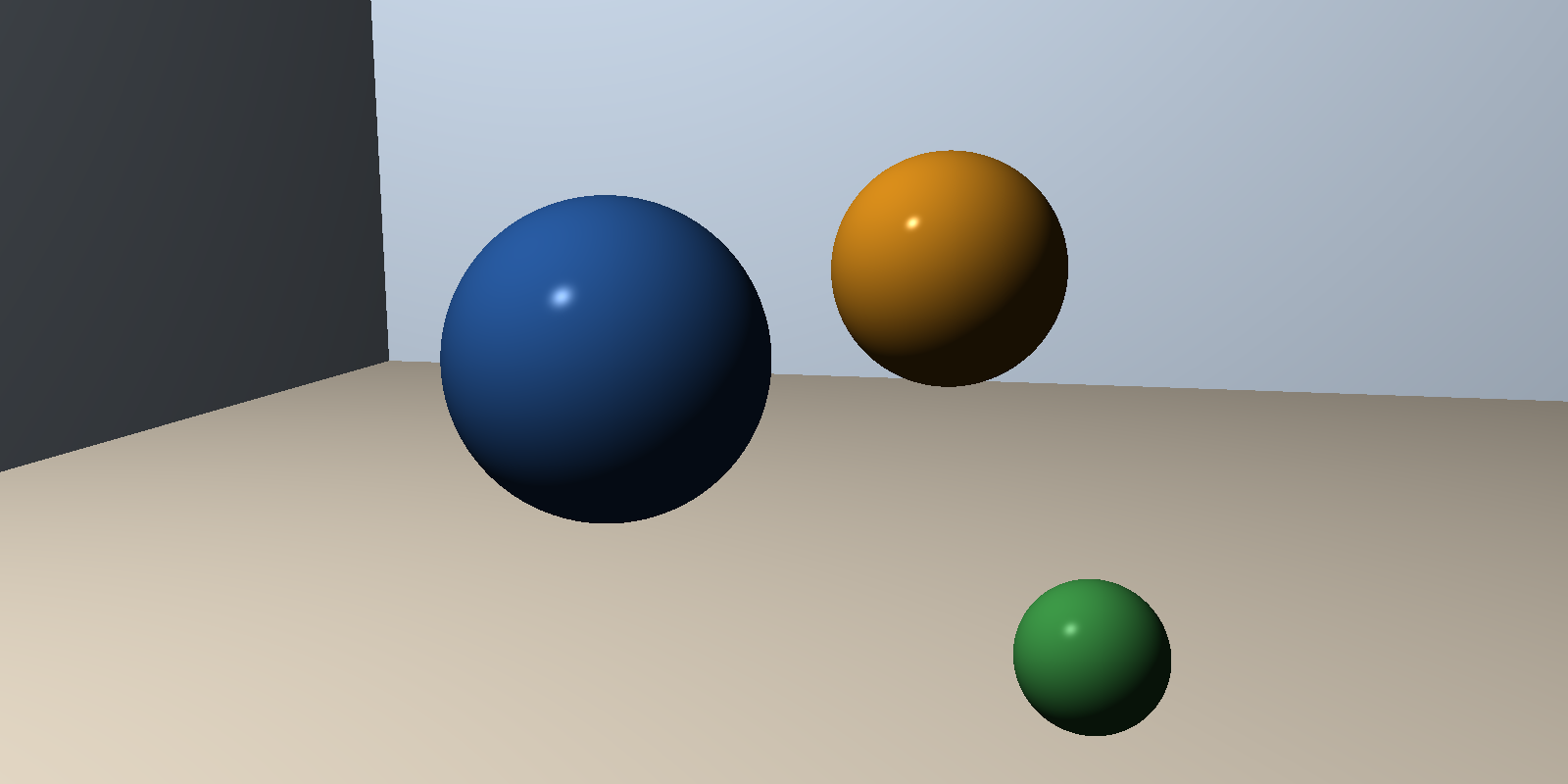
A floor and two walls (behind and to the left) made of flattened balls, since there are
no planes yet at this level of the story, and three balls: a big blue one resting on the
floor, an amber one hovering in the air, and a small green one. The light is above, to
the left and in front; the eye at (1.5, 2.2, −6.5) looks at (0, 1, 0.3), 400×200, field
of view π/3. This picture is rendered without shadows; the next page
adds them, and the amber ball's shadow then lies on the floor apart from it.
make a function called demo_spheres returns xs
  let resting = set_material(set_transform(sphere(), translation(-(13/10), 1, (6/5))), material_with(color((1/5), (9/20), (4/5)), (1/10), (7/10), (1/2), 150))
  let hovering = set_material(set_transform(sphere(), mat_mul(translation((9/10), (17/10), -(1/5)), scaling((11/20), (11/20), (11/20)))), material_with(color((19/20), (31/50), (3/25)), (1/10), (4/5), (3/5), 250))
  let small = set_material(set_transform(sphere(), mat_mul(translation((8/5), (3/10), -(7/5)), scaling((3/10), (3/10), (3/10)))), material_with(color((3/10), (3/4), (7/20)), (1/10), (7/10), (3/10), 80))
  return [resting, hovering, small]
end

# the light of the three balls' scenes
make a function called spheres_light returns l
  return point_light(point(-4, 9, -6), color(1, 1, 1))
end

# the eye of the three balls' scenes: [from, to]
make a function called spheres_view returns v
  return [point((3/2), (11/5), -(13/2)), point(0, 1, (3/10))]
end

# a floor and two walls (behind and to the left) as flattened balls
make a function called build_scene returns w
  let floor_m = material_with(color((19/20), (9/10), (41/50)), (1/10), (9/10), 0, 200)
  let wall_m = material_with(color((41/50), (22/25), (19/20)), (1/10), (9/10), 0, 200)
  let flat = scaling(12, (1/100), 12)
  let floor_s = set_material(set_transform(sphere(), flat), floor_m)
  let back_wall = set_material(set_transform(sphere(), mat_mul(translation(0, 0, 7), mat_mul(rotation_x(pi() / 2), flat))), wall_m)
  let left_wall = set_material(set_transform(sphere(), mat_mul(translation(-6, 0, 0), mat_mul(rotation_z(pi() / 2), flat))), wall_m)
  let sp = demo_spheres()
  return [[floor_s, back_wall, left_wall, sp[0], sp[1], sp[2]], spheres_light(), true]
end
# Chapter 7, "Putting It Together": a floor, two walls and three spheres,
# viewed through a camera with a view transformation. Shadows arrive in Chapter 8,
# so they are switched off here (worlds cast them by default).
include "../lib/spec.patlang"
include "../lib/png.patlang"
include "../lib/camera.patlang"
include "../lib/demo_scene.patlang"

let w = set_world_shadows(build_scene(), false)
let cam = set_camera_transform(camera(400, 200, pi() / 3), view_transform(spheres_view()[0], spheres_view()[1], vector(0, 1, 0)))
render_example(cam, w, "../out/ch07_scene.png")
> tools/prender.sh examples/ch07_scene.patlang
assembled 400x200 from 40 bands
rendered with 18 parallel processes (40 bands) in 374 s wall clock
Checking it independently
A separate tracer, written for this check, recomputes every pixel (all 80 000): PowerShell
with plain doubles, its own 4×4 multiply and Gauss-Jordan inverse, the book's
formulas for the view transform, the camera, ray/sphere, normals
(transpose(inverse(M))) and Phong. It uses no algebra and none of this
project's code, and it uses the book's un-normalized left, so it also pins
the finding above.
> powershell.exe -NoProfile -File tools/verify_scene.ps1 out/ch07_scene.png -Stride 1
decoded by .NET: 400x200; pixels covered by an object: 80000; pixels differing from the independent tracer by more than 1 level: 0 (max difference 1); stride 1 in each direction, 80000 pixels checked
How it is checked
> v2_interp.exe tests/run.patlang --node picture/camera --depth 2
[ ok ] The camera
[ ok ]   Pixels cover the field of view, across the longer side
[ ok ]   The ray through the middle pixel of an odd-sized picture looks straight ahead
[ ok ]   The corner rays meet the field of view: a quarter turn across, corners symmetric
[ ok ]   A moved camera's rays start at its eye and look where it looks
[ ok ]   Every ray the camera makes has length 1
[ ok ]   Making the whole picture  (all, giving the same answer)
[ ok ]     naive: color_at for each pixel's ray
[ ok ]     render(): rows, with the world's boxes
[ ok ]   A camera keeps its field of view and transform
[ ok ]   Further checks, independent of the code they check
[ ok ]     R e_i ~R = a_i for 7 frames, including the half-turn (degenerate) ones
[ ok ]     View_transform = the book's orientation * translation (8 cases)
[ ok ]     Ray directions are unit length
checks: 11 passed, 0 failed, 0 blocked, 0 skipped, 0 not run
ALL PASSED
> v2_interp.exe tests/run.patlang --node picture/world --depth 2
[ ok ] The world a ray searches
[ ok ]   An empty world has nothing in it and no light
[ ok ]   A ray's hits in the world are every object's hits, sorted
[ ok ]   Preparing a hit from outside: the point, the eye, the normal facing the eye
[ ok ]   Preparing a hit from inside: the normal is turned to face the eye
[ ok ]   The point for shadows and reflections is a hair above the surface, the one for refraction a hair below
[ ok ]   A ray that meets nothing sees black
[ ok ]   What twelve rays see in the test scene, against the oracle's tracer
[ ok ]   Searching the world  (all, giving the same answer)
[ ok ]     naive: test every object
[ ok ]     faster: skip an object whose box the ray misses
[ ok ]   A world of many objects
[ ok ]     Searching sixty-three objects  (all, giving the same answer)
[ ok ]     Shadows in a world of many objects  (all, giving the same answer)
[ ok ]     A world of more than a handful of objects gets a tree, and a ray tries few of its objects
[ ok ]     A tree whose world has had objects added (as a frame of the film adds its rabbit) is not used
[ ok ]     Negative control: a tree with all its leaves but one emptied gives different hits
[ ok ]   A prepared hit names its object; shade_hit gives what color_at sees
[ ok ]   The library's demonstration scenes, with and without the world's boxes
[ ok ]     The glass scene  (all, giving the same answer)
[ ok ]     The csg scene  (all, giving the same answer)
[ ok ]     The cube scene  (all, giving the same answer)
checks: 24 passed, 0 failed, 0 blocked, 0 skipped, 0 not run
ALL PASSED
Graduate Attributes
Modelled on this page
- Researcher: Performance profiling identifies specific computational bottlenecks in the code implementation.
- Critical Thinker: A discrepancy between standard algorithms and geometric algebra formulations is investigated to reveal hidden scaling factors.
- Digitally Fluent: An independent reference implementation is used to validate the correctness of the primary rendering engine.
University of Reading Graduate Attributes framework.