Last updated: 2026-11-26
3. Light at a point, and shadows
For new readers
The world finds the point a ray meets and asks what colour it is. This page answers for light: Phong's mix of ambient, diffuse and specular light at a point, shadows (is anything between the point and the light?), lights with a size, which cast soft shadows, spotlights, and pixels that are areas rather than points (antialiasing). The colour of the surface itself, plain or patterned or textured, comes from part V; the normal at the point from the shape, in part IV. Mirrors and glass, which send further rays, are the next page.
Light and Shading
A surface normal, a reflection vector, a point light, a material, and the Phong model that combines them. Two places in this page are where geometric algebra replaces something the book has to patch: reflection, and the transformation of normals.
Step 1 — reflection is a versor
Reflecting a vector v about a unit normal n is the sandwich −n v n. Expand
it with n v = n·v + n∧v:
−n v n = −(2 (n·v) n − v n n) = v − 2 (v·n) n (n n = 1)
— the book's formula, arising as one product. For a non-unit normal the
inverse n⁻¹ = n / n² is used, so the function is correct for any normal, not
only normalized ones.
# Reflect the vector `in` about `normal`: the GA reflection  -n v n^-1  which for any n
# is  v - 2 (v.n)/(n.n) n,  the book's formula. Written out (reflect_ga is the versor
# product itself; the test tree, foundations/tuples/reflect/ways, checks they agree).
make a function called reflect takes inv, normal returns r
  let nx = get_x(normal)
  let ny = get_y(normal)
  let nz = get_z(normal)
  let k = 2 * (get_x(inv) * nx + get_y(inv) * ny + get_z(inv) * nz) / (nx * nx + ny * ny + nz * nz)
  return cga_direction(get_x(inv) - k * nx, get_y(inv) - k * ny, get_z(inv) - k * nz)
end
Step 2 — normals of a transformed sphere
In object space the normal of the unit sphere at a point X is the direction
X − centre. The book carries that to world space by multiplying with
transpose(inverse(M)) and then forcing w to 0 — its own words are "a bit of
a hack", because otherwise the translation part of the transpose corrupts w.
The geometric reading is different. A normal is dual to the tangent plane:
two tangent vectors u, v at the point become M u, M v under the
transformation, and the normal is perpendicular to both. For the 3×3 part A
of M,
(A u) × (A v) = cof(A) (u × v)
where cof(A) is the matrix of cofactors. So the world normal is cof(A)
times the object normal, up to the sign of det A (which flips the cross
product's orientation for a reflection). The cofactors are the wedge minors of
Matrices, and the 3×3 part carries no translation, so there is no w to
patch. The matrix is computed once, in set_transform, next to the inverse.the cofactor matrix is the adjugate
make a function called normal_matrix takes m returns rows
  let a = submatrix(m, 3, 3)
  let sgn = 1
  if determinant(a) < 0 then
    let sgn = -1
  end
  let rows = []
  let r = 0
  while r < 3 do
    let row = []
    let c = 0
    while c < 3 do
      let row = list_push(row, sgn * cofactor(a, r, c))
      let c = c + 1
    end
    let rows = list_push(rows, mat_vec(row))
    let r = r + 1
  end
  return rows
end
make a function called intersect takes s, r returns xs
  if s[8] then
    return local_intersect(s, r)
  end
  return local_intersect(s, transform_ray(r, s[2]))
end
Step 3 — materials, lights, the Phong model
Colours are the Euclidean GA vectors of Colours, the canvas and picture files; the eye, light and normal vectors are direction bivectors; the reflection vector is the sandwich from Step 1. Each Phong term is the book's.
make a function called material returns m
  return [color(1, 1, 1), (1/10), (9/10), (9/10), 200, false, 0, 0, 1, false]
end

make a function called material_with takes c, ambient, diffuse, specular, shininess returns m
  return [c, ambient, diffuse, specular, shininess, false, 0, 0, 1, false]
end
make a function called point_light takes position, intensity returns l
  return [position, intensity]
end

make a function called light_position takes l returns p
  return l[0]
end

make a function called light_intensity takes l returns c
  return l[1]
end

make a function called lighting takes m, object, light, p, eyev, normalv, in_shadow returns c
  return lighting_color(m, surface_color(m, object, p), light, p, eyev, normalv, in_shadow)
end
Step 4 — checks
The shading checks (the shading node at the end of this page) compare six lighting
configurations with Phong's equation written out independently in tools/oracle.py, and
check what must hold whatever the numbers: light from behind a surface, or blocked,
leaves only the ambient part; diffuse light falls off with the cosine of the light's
slope; the highlight is brightest where the eye looks along the reflected light.
The normals deserve more than a few points, because the cofactor construction is exactly
the part that replaces the usual transpose(inverse(M)). Independent oracles:
- the gradient: every shape is checked against an implicit function written in the test, and the normal at each hit must lie along the function's gradient, including on shapes turned, unevenly stretched and moved (spheres and planes);
- the usual formula: for eight transformations (identity, translation, two scalings,
scale·rotation, shear·scale, a three-part chain and a mirror) and six surface points
each, the cofactor normal equals the
transpose(inverse(M))normal; - perpendicularity, with no formula for how normals transform: a tangent vector of
the unit sphere, moved with
M, is perpendicular to the world normal; and multiplying the normal byMitself, the naive approach, fails that test, so the test can fail; - outward, including for a mirror, where
det A < 0and the sign matters.
Reflection has its own checks in the algebra: it keeps a direction's
length, flips the part along the normal, undoes itself, and the sandwich −n v n / n·n
agrees with the formula on three numbers.
Step 5 — Putting it together: the shaded sphere
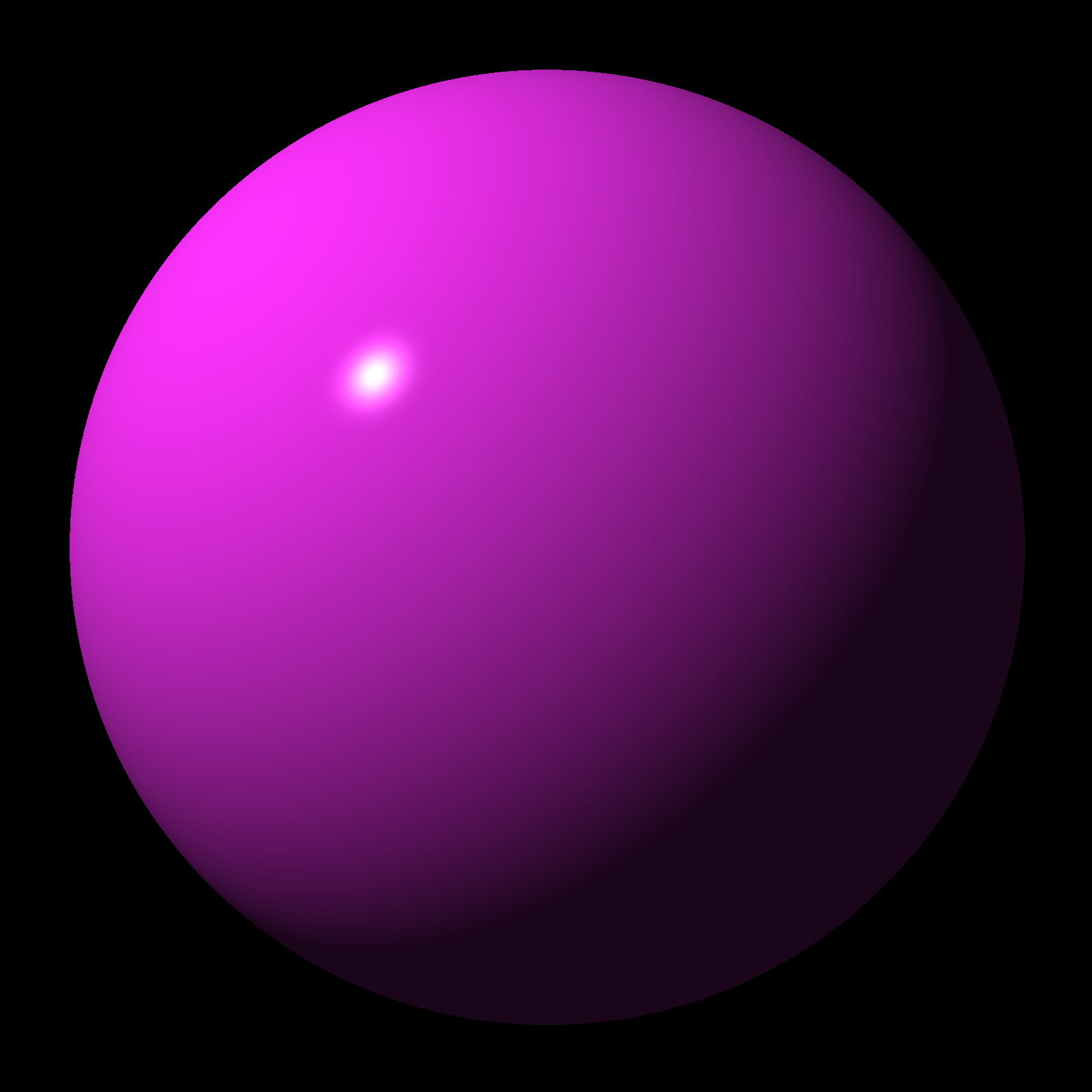
This page-5 program with a magenta material, a white light at
(−10, 10, −10), normalized ray directions, and the normal, eye and lighting
calls at each hit.
# Chapter 6, "Putting It Together": the silhouette of chapter 5 shaded with
# the Phong model. Magenta sphere; the white light is up and to the left, on
# the camera's side of it.
include "../lib/spec.patlang"
include "../lib/png.patlang"
include "../lib/ray.patlang"
include "../lib/shape.patlang"
include "../lib/light.patlang"

make a function called render_sphere takes canvas_pixels returns c
  let ray_origin_pt = point(0, 0, -5)
  let wall_z = 10
  let wall_size = 7
  let pixel_size = wall_size / canvas_pixels
  let half = wall_size / 2
  let c = canvas(canvas_pixels, canvas_pixels)
  let shape = set_material(sphere(), with_color(material(), color(1, (1/5), 1)))
  let light = point_light(point(-10, 10, -10), color(1, 1, 1))
  let y = 0
  while y < canvas_pixels do
    let world_y = half - pixel_size * y
    let x = 0
    while x < canvas_pixels do
      let world_x = 0 - half + pixel_size * x
      let target = point(world_x, world_y, wall_z)
      let r = ray(ray_origin_pt, normalize(tuple_sub(target, ray_origin_pt)))
      let h = hit(intersect(shape, r))
      if h.length > 0 then
        let p = position(r, i_t(h))
        let n = normal_at(i_object(h), p)
        let eye = tuple_neg(ray_direction(r))
        write_pixel(c, x, y, lighting(shape_material(i_object(h)), i_object(h), light, p, eye, n, false))
      end
      let x = x + 1
    end
    let y = y + 1
  end
  return c
end

let t0 = now_ms()
let c = render_sphere(400)
print("rendered 400x400 in " + (now_ms() - t0) + " ms")
save_png(c, "../out/ch06_sphere.png")
print("wrote out/ch06_sphere.png")
> cd examples && v2_interp.exe ch06_shaded_sphere.patlang
rendered 400x400 in 810794 ms
wrote out/ch06_sphere.png
Checking it independently
A picture that looks right proves little about 160 000 pixel values. A separate script (PowerShell, plain doubles, written from the Phong equations; no algebra, no matrices, none of this project's code) recomputes every pixel from scratch (all 160 000 of the 400×400 image) and compares it with the PNG that .NET decodes:
> powershell.exe -NoProfile -File tools/verify_phong.ps1 out/ch06_sphere.png -Stride 1
decoded by .NET: 400x400; sphere pixels: 96173; pixels differing from the independent Phong by more than 1 level: 0 (max difference 0); stride 1 in each direction, 160000 pixels checked
Cost
| canvas | time | per pixel |
|---|---|---|
| 25 × 25 | 820 ms | 1.31 ms |
| 50 × 50 | 3 176 ms | 1.27 ms |
| 100 × 100 | 13 347 ms | 1.33 ms |
Linear in pixels, but about 2.5× the silhouette (0.52 ms): the extra half
dozen products per hit (normal, lighting, reflection) and the hit/miss
split now matter. The camera and the world it looks at's camera will cast one ray per pixel across a whole
world, so the budget for shading gets tightened there; profiling comes with it.
Follow-up: the profiling in The camera and the world it looks at removed most of this cost; the same 100×100 render now takes about 5 s (about 0.5 ms per pixel). The table above is the Light at a point, and shadows measurement, left as measured.
Shadows
A point is in shadow when something lies on the segment between it and the
light. The pieces are a shadow ray, a distance to compare the hit against, a
nudge so the ray does not start inside the surface it just left, and an extra
argument to lighting.
Step 1 — distance is an inner product
The book measures the distance to the light as magnitude(light − point). For
two conformal points the inner product is already the squared distance:
P · Q = −½ |p − q|² so |p − q| = √(−2 P·Q)
That is one five-term ga_vec_dot on the points themselves — no subtraction,
no vector. (For identical points rounding can leave P·Q a hair above 0, so
the squared distance is clamped at 0 before the square root; nothing else is
clamped.)
# Distance between two conformal points. For null vectors P, Q the inner
# product is  P . Q = -|p - q|^2 / 2,  so the distance is sqrt(-2 P.Q). The
# squared distance is clamped at 0: for identical points rounding can leave
# P.Q a hair above 0.
make a function called distance_between takes a, b returns d
  let d2 = 0 - 2 * ga_vec_dot(a, b)
  if d2 < 0 then
    return 0
  end
  return sqrt(d2)
end
The tests compare it with the book's magnitude(P − Q) on all 25 pairs of five
points, and give two exact cases (a point to itself, and (0,0,0) to
(3,4,12), distance 13).
Step 2 — shadows
is_shadowed(world, point) casts a ray from the point toward the light,
intersects the world, and compares the hit's t with the distance. hit
already returns the lowest non-negative t, so objects behind the point never
count.
prepare_computations gains over_point: the hit point translated
EPSILON along the normal, a translator sandwich like any other
point-plus-vector. shade_hit tests for shadow from over_point and passes the
result to lighting, which now returns only the ambient term when the point is
shadowed.EPSILON nudge prevents self-intersection artifacts
  let tree = false
  if items.length > 0 then
    let tree = bvh_build(items, boxes)
  end
  return list_set(w2, 7, [objs.length, tree, always])
end
(prepare_computations computes this offset as part of the record it returns; its other fields are described in The camera and the world it looks at and Mirrors and glass.)
make a function called c_over_point takes c returns v
  return c[6]
end

# ... and the light's own position (an area light's centre)
make a function called is_shadowed takes w, p returns ok
  return is_shadowed_to(w, p, w[1][0])
end
make a function called shade_hit takes w, comps, remaining returns c
  let surface = surface_lighting(w, comps)
  let reflected = reflected_color(w, comps, remaining)
  let refracted = refracted_color(w, comps, remaining)
  let m = shape_material(comps[1])
  if m_reflective(m) > 0 and m_transparency(m) > 0 then
    let reflectance = schlick(comps)
    return color_add(color_add(surface, color_scale(reflected, reflectance)), color_scale(refracted, 1 - reflectance))
  end
  return color_add(color_add(surface, reflected), refracted)
end
(Shown as the project finishes: the shadowed flag is computed from over_point and passed to lighting exactly as described; Mirrors and glass later adds the reflected and refracted terms after it.)
make a function called lighting takes m, object, light, p, eyev, normalv, in_shadow returns c
  return lighting_color(m, surface_color(m, object, p), light, p, eyev, normalv, in_shadow)
end
Step 3 — checks
The shadow checks (the shadows node) take the points of the test scene that the oracle
of tools/oracle.py finds in shadow and in light, and require the same answer; then
the things that must hold: something beyond the light casts no shadow towards it, a
surface does not shadow itself once its point is lifted, a floor point in shadow gets
brighter when shadows are switched off. Further, independent of the code:
- An analytic shadow. A unit sphere at the origin lit from
(0, 0, −10)casts a circular shadow on the planez = 5of radius15 / √99 ≈ 1.5076(a cone of half-angleasin(1/10)and height 15). Points0.01inside the edge are shadowed and points0.01outside are lit, in y and in x; points between the light and the sphere, and behind the light, are lit. - The offset is what it says it is: for a sphere that is translated and non-uniformly
scaled,
over_point − pointhas lengthEPSILONand points along the normal. - The distance to the light as a conformal inner product,
|p − q| = √(−2 P·Q).
Step 4 — Putting it together: the scene with shadows
The scene of the camera and the world it looks at (in lib/demo_scene.patlang, shared by both pages),
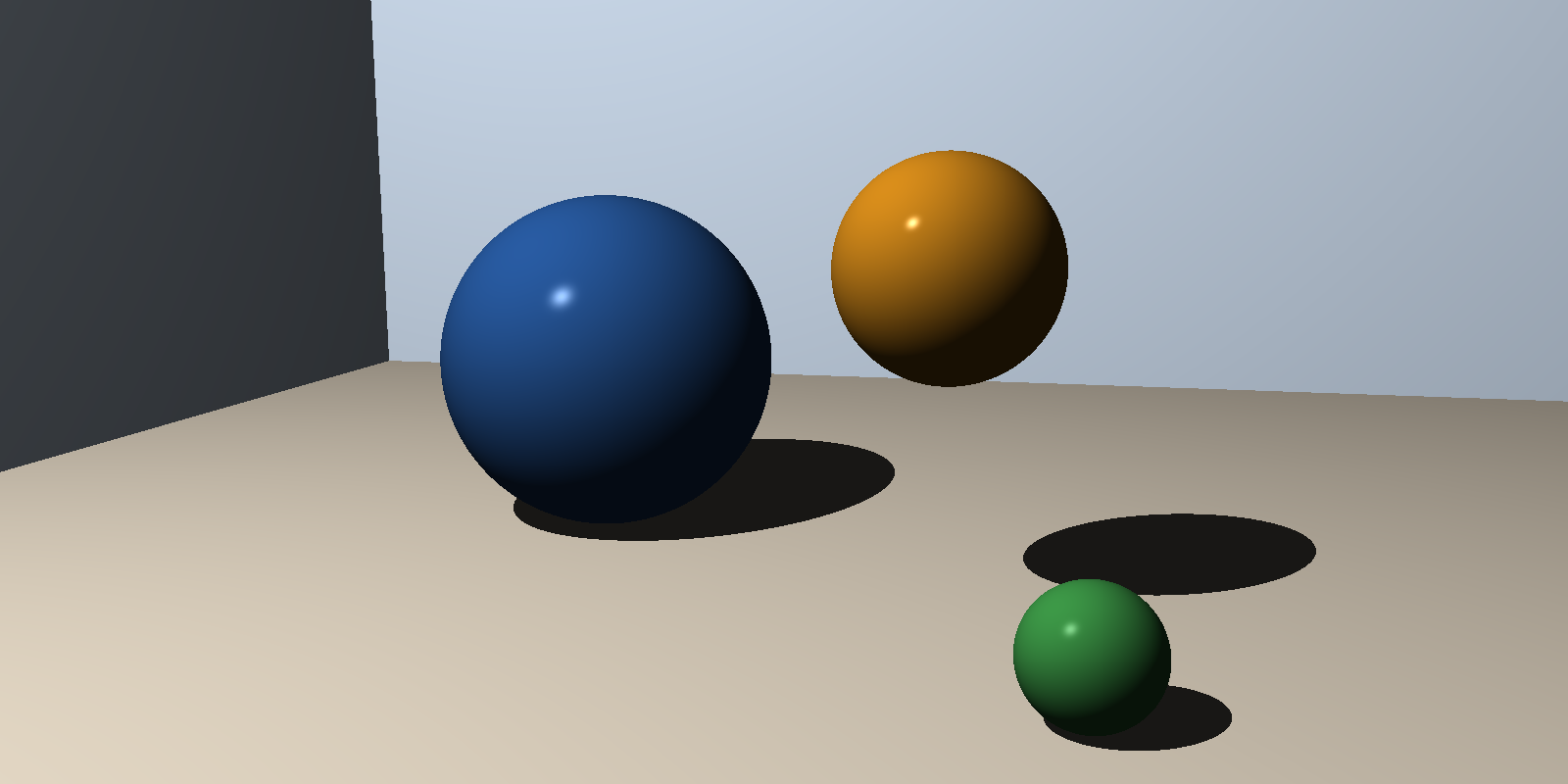
rendered at 400×200 so the shadows are visible. The amber ball hovers, so its shadow lies on the floor
away from it, below and behind; the resting balls' shadows touch them.
# Chapter 8, "Putting It Together": the chapter-7 scene again, with and without
# shadows (the world's shadow switch), at 200x100 so the shadows are visible.
include "../lib/spec.patlang"
include "../lib/png.patlang"
include "../lib/camera.patlang"
include "../lib/demo_scene.patlang"

let w = build_scene()
let cam = set_camera_transform(camera(400, 200, pi() / 3), view_transform(spheres_view()[0], spheres_view()[1], vector(0, 1, 0)))
render_example(cam, w, "../out/ch08_shadows.png")
render_example(cam, set_world_shadows(w, false), "../out/ch08_no_shadows.png")
> tools/prender.sh examples/ch08_shadows.patlang
assembled 400x200 from 40 bands
assembled 400x200 from 40 bands
rendered with 18 parallel processes (40 bands) in 752 s wall clock
With shadows:
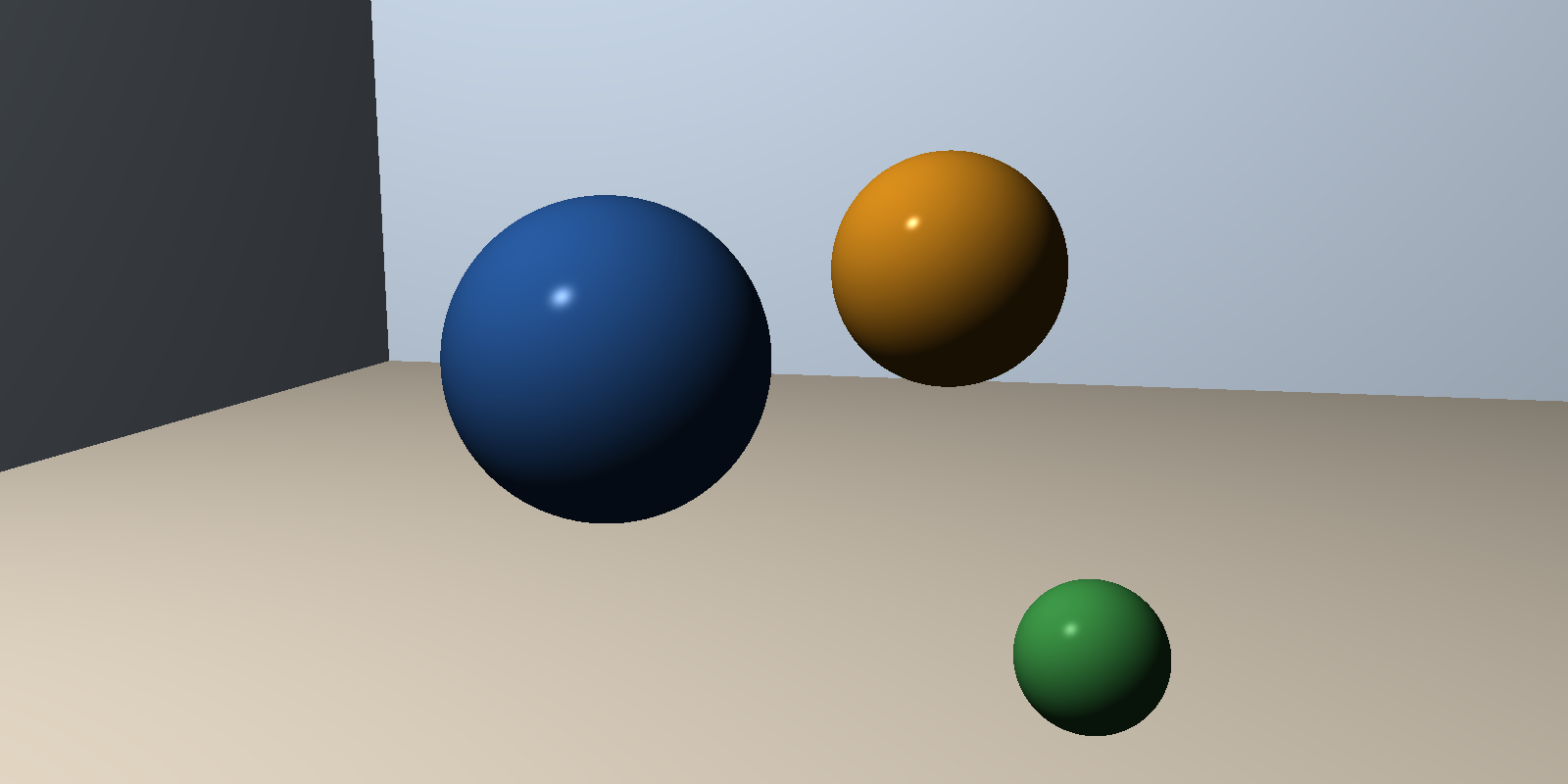
Without them (the same world with the switch off, set_world_shadows(w, false)):
make a function called set_world_shadows takes w, on returns w2
  return list_set(world_full(w), 2, on)
end

# Shadows are on by default. The switch exists to show a scene with and without
# them (the book's Chapter 8 does exactly that comparison).
make a function called world_shadows takes w returns on
  return w[2]
end
The switch also keeps the example of the camera and the world it looks at in step with its check: that page comes before shadows, so its example turns them off, and its picture and its independent check describe the same thing.
Checking it independently
The from-scratch tracer of The camera and the world it looks at gained a -Shadows mode. It casts its own
shadow rays in plain doubles — from the hit point nudged 1e-5 along the
normal toward the light, comparing t with the distance — and recomputes every pixel (all 80 000 of the 400×200 image; each result line states the stride and the count):
> powershell.exe -NoProfile -File tools/verify_scene.ps1 out/ch08_shadows.png -Shadows -Stride 1
decoded by .NET: 400x200; pixels covered by an object: 80000; pixels differing from the independent tracer by more than 1 level: 0 (max difference 0); stride 1 in each direction, 80000 pixels checked
The image rendered with the switch off is checked by the same tracer without -Shadows (it must agree), which is also the camera page check:
> powershell.exe -NoProfile -File tools/verify_scene.ps1 out/ch08_no_shadows.png -Stride 1
decoded by .NET: 400x200; pixels covered by an object: 80000; pixels differing from the independent tracer by more than 1 level: 0 (max difference 1); stride 1 in each direction, 80000 pixels checked
A check that cannot fail proves little, so the same image is compared with the same tracer without shadows. The shadowed pixels are exactly where they disagree:
> powershell.exe -NoProfile -File tools/verify_scene.ps1 out/ch08_shadows.png -Stride 1
decoded by .NET: 400x200; pixels covered by an object: 80000; pixels differing from the independent tracer by more than 1 level: 2649 (max difference 171); stride 1 in each direction, 80000 pixels checked
Why over_point — acne, measured
The book warns that testing for shadow from the exact hit point gives a speckled "acne" picture. The intersection point comes from a square root, so it lands a rounding error above or below the surface, and when it is below, the shadow ray immediately hits the sphere it started on. The experiment renders the scene twice at 100×50, once as above and once testing from the un-nudged point, and counts the pixels where the two renders differ:
make a function called shade_hit_no_offset takes w, comps returns c
  let shadowed = is_shadowed(w, comps[2])
  return lighting(shape_material(comps[1]), comps[1], w[1], comps[2], comps[3], comps[4], shadowed)
end

make a function called color_at_no_offset takes w, r returns c
  let h = hit(intersect_world(w, r))
  if h.length == 0 then
    return color(0, 0, 0)
  end
  return shade_hit_no_offset(w, prepare_computations(h, r, [h]))
end
> cd examples && v2_interp.exe ch08_acne.patlang
pixels where the un-nudged shadow test disagrees with the nudged one: 2815 of 5000
Cost
Shadow rays double the number of ray/object tests per hit. Measured alone at the book's 100×50: 6.2 s without shadows, 10.4 s with (1.7×), about 2 ms per pixel. The 400×200 images above are 80 000 pixels each, a few minutes apiece. The times printed in the output blocks come from a build that ran every page in parallel on one machine, so they are about 1.5× longer than the same render run alone.
Area Lights, Spotlights, Anti-aliasing
The first of the book's "next steps": lights that are not points, and pixels that are not points either. Each of the three features replaces a single sample by an average over many: area lights over positions on the light, anti-aliasing over positions in the pixel. Spotlights are one point light with a cone.
Step 1 — a light with an extent
A point light gives every surface point a yes or no: is something between us and the
light? Real lights have size, so a point can see part of the light, and the shadow's
edge becomes a gradient (the penumbra). An area light here is a parallelogram of
usteps × vsteps cells, spanned by two vectors from a corner; one sample point sits in
each cell (the cell's middle, or moved inside the cell by a jitter). A surface is lit by
the average of point lights at the sample points, each with its own shadow test, which
is the book's bonus-chapter rule:penumbra: partial shadow from a light with extent
colour = (1/n) Σ lighting(material, point light at sample k, shadow_k) (ambient once, in every term)
intensity_at(world, light, p) is the fraction of the samples that p can see:
0 in the full shadow, 1 in the full light, in between in the penumbra.
The jitter depends only on the cell (the additive recurrence frac(½ + c·0.7548776662)
and frac(½ + c·0.5698402909) for cell c), never on a changing counter, so a picture is
the same whether rendered in one piece or in forty parallel bands. A sample is not cast
at all when its light is on the far side of the surface (n · l < 0): the surface takes
only its ambient light from it, blocked or not.
make a function called area_light takes corner, uvec, usteps, vvec, vsteps, intensity, jitter returns l
  let ustep = tuple_div(uvec, usteps)
  let vstep = tuple_div(vvec, vsteps)
  let centre = tuple_add(tuple_add(corner, tuple_mul(uvec, (1/2))), tuple_mul(vvec, (1/2)))
  let l = [centre, intensity, "area", corner, ustep, usteps, vstep, vsteps, [], jitter]
  let samples = []
  let u = 0
  while u < usteps do
    let v = 0
    while v < vsteps do
      let samples = list_push(samples, point_on_light(l, u, v))
      let v = v + 1
    end
    let u = u + 1
  end
  return list_set(l, 8, samples)
end

make a function called light_corner takes l returns p
  return l[3]
end

make a function called light_uvec takes l returns v
  return l[4]
end

make a function called light_usteps takes l returns n
  return l[5]
end

make a function called light_vvec takes l returns v
  return l[6]
end

make a function called light_vsteps takes l returns n
  return l[7]
end

make a function called light_samples takes l returns ps
  if l.length > 2 and l[2] == "area" then
    return l[8]
  end
  return [l[0]]
end

# the fraction of the cell (u, v) at which its sample sits, in x and in y
make a function called jitter_fractions takes l, u, v returns f
  let jitter = l[9]
  if jitter == false then
    return [(1/2), (1/2)]
  end
  let c = u * l[7] + v
  if jitter == "r2" then
    let a = 0.5 + c * 0.7548776662466927
    let b = 0.5 + c * 0.5698402909
    return [a - floor(a), b - floor(b)]
  end
  return [jitter[(2 * c) % jitter.length], jitter[(2 * c + 1) % jitter.length]]
end

make a function called point_on_light takes l, u, v returns p
  let f = jitter_fractions(l, u, v)
  return tuple_add(tuple_add(l[3], tuple_mul(l[4], u + f[0])), tuple_mul(l[6], v + f[1]))
end
# true when something lies between the point and a position
make a function called is_shadowed_to takes w, p, light_pos returns ok
  return shadow_blocker(w, p, light_pos, unit_toward(p, light_pos), -1) >= 0
end

# ... and the light's own position (an area light's centre)
make a function called is_shadowed takes w, p returns ok
  return is_shadowed_to(w, p, w[1][0])
end

make a function called set_world_shadows takes w, on returns w2
  return list_set(world_full(w), 2, on)
end

# per sample of the light: is something in the way of p (all false when the world
# has its shadows switched off)
make a function called blocked_samples takes w, light, p returns flags
  let samples = light_samples(light)
  if w[2] and hull_clear(w, light, p) then
    return all_clear_flags(light)
  end
  let flags = []
  let hint = -1
  let k = 0
  while k < samples.length do
    let blocked = false
    if w[2] then
      let idx = shadow_blocker(w, p, samples[k], unit_toward(p, samples[k]), hint)
      let blocked = idx >= 0
      if blocked then
        let hint = idx
      end
    end
    let flags = list_push(flags, blocked)
    let k = k + 1
  end
  return flags
end

# the same for shading a surface whose normal is n: a sample on the far side of the
# surface lights nothing whether or not it is blocked, so its ray is not cast
make a function called blocked_samples_facing takes w, light, p, n returns flags
  let samples = light_samples(light)
  if w[2] and hull_clear(w, light, p) then
    return all_clear_flags(light)
  end
  let flags = []
  let hint = -1
  let k = 0
  while k < samples.length do
    let blocked = false
    if w[2] then
      let u = unit_toward(p, samples[k])
      if dot(u, n) >= 0 then
        let idx = shadow_blocker(w, p, samples[k], u, hint)
        let blocked = idx >= 0
        if blocked then
          let hint = idx
        end
      end
    end
    let flags = list_push(flags, blocked)
    let k = k + 1
  end
  return flags
end

# the light's sample points that p can see. A point light is all or nothing; a
# spotlight scales that by its cone.
make a function called intensity_at takes w, light, p returns f
  let flags = blocked_samples(w, light, p)
  let seen = 0
  let k = 0
  while k < flags.length do
    if not flags[k] then
      let seen = seen + 1
    end
    let k = k + 1
  end
  let f = seen / flags.length
  if light_kind(light) == "spot" then
    return f * spot_factor(light, p)
  end
  return f
end
Step 2 — a spotlight
A spotlight is a point light that only lights a cone about a direction d. For a point
p, the angle θ between d and the direction from the light to p comes from the
inner product of two unit vectors, cos θ = d · v̂. The light is full inside the inner
half-angle, nothing at and beyond the outer, and falls off linearly in the angle between.
Diffuse and specular terms are scaled by that factor; the ambient term is not (outside the
cone the surface is dark, not black).
# the cone is given as half-angles in radians
make a function called spot_light takes position, direction, outer, inner, intensity returns l
  return [position, intensity, "spot", normalize(direction), outer, inner]
end

make a function called spot_factor takes l, p returns f
  let v = tuple_sub(p, l[0])
  if magnitude(v) == 0 then
    return 1
  end
  let c = dot(l[3], normalize(v))
  if c > 1 then
    let c = 1
  end
  if c < -1 then
    let c = -1
  end
  let theta = acos(c)
  if theta <= l[5] then
    return 1
  end
  if theta >= l[4] then
    return 0
  end
  return (l[4] - theta) / (l[4] - l[5])
end
make a function called surface_color takes m, object, p returns base
  let base = m[0]
  if m[5] != false then
    let base = pattern_at_shape(m[5], object, p)
  end
  return base
end

# ambient + diffuse + specular of a surface colour `base` under one light: for a
# spotlight the diffuse and specular terms are scaled by its cone factor
make a function called lighting_color takes m, base, light, p, eyev, normalv, in_shadow returns c
  let factor = 1
  if light.length > 2 and light[2] == "spot" then
    let factor = spot_factor(light, p)
  end
  let effective = color_mul(base, light[1])
  let lightv = normalize(tuple_sub(light[0], p))
  let ambient = color_scale(effective, m[1])
  let black = color(0, 0, 0)
  let diffuse = black
  let specular = black
  let light_dot_normal = dot(lightv, normalv)
  if light_dot_normal >= 0 and not in_shadow and factor > 0 then
    let diffuse = color_scale(effective, m[2] * light_dot_normal * factor)
    let reflectv = reflect(tuple_neg(lightv), normalv)
    let reflect_dot_eye = dot(reflectv, eyev)
    if reflect_dot_eye > 0 then
      let spec = pow(reflect_dot_eye, m[4])
      let specular = color_scale(light[1], m[3] * spec * factor)
    end
  end
  return color_add(color_add(ambient, diffuse), specular)
end

make a function called lighting takes m, object, light, p, eyev, normalv, in_shadow returns c
  return lighting_color(m, surface_color(m, object, p), light, p, eyev, normalv, in_shadow)
end

# an area light: the average over its samples of the lighting under a point light
# there. `blocked` is false (nothing is in the way) or a list saying, per sample,
# whether something is.
make a function called lighting_area takes m, object, light, p, eyev, normalv, blocked returns c
  let base = surface_color(m, object, p)
  let samples = light[8]
  let sum = color(0, 0, 0)
  let k = 0
  while k < samples.length do
    let shadow = false
    if blocked != false then
      let shadow = blocked[k]
    end
    let sum = color_add(sum, lighting_color(m, base, [samples[k], light[1]], p, eyev, normalv, shadow))
    let k = k + 1
  end
  return color_scale(sum, 1 / samples.length)
end
Step 3 — a pixel is an area
One ray through the middle of a pixel decides the pixel's whole colour, so an edge that
cuts the pixel at an angle shows as a staircase. Anti-aliasing averages rays through
several points of the pixel. ray_for_pixel_at(camera, px, py, fx, fy) gives the ray
through the point (fx, fy) of the pixel, fractions from its left and top edges.
- Supersampling: an
n × ngrid of rays at((i + ½)/n, (j + ½)/n), averaged. - Adaptive sampling: cast the four corners and the centre. If a corner differs from
the centre by more than a threshold in any channel, cut the square into four quarters
and treat each the same way, down to a limited depth; a square that stops contributes
(sum of the four corners + 4 × centre) / 8. A uniform pixel costs 5 rays.
make a function called sample_at takes c, w, px, py, fx, fy returns col
  let tr = world_tracing(w)
  if tr != false then
    if tr.counting then
      tr.samples = tr.samples + 1
    end
  end
  return color_at(w, ray_for_pixel_at(c, px, py, fx, fy))
end

make a function called supersample_pixel takes c, w, px, py, n returns col
  let sum = color(0, 0, 0)
  let i = 0
  while i < n do
    let j = 0
    while j < n do
      let sum = color_add(sum, sample_at(c, w, px, py, (i + 1/2) / n, (j + 1/2) / n))
      let j = j + 1
    end
    let i = i + 1
  end
  return color_scale(sum, 1 / (n * n))
end

make a function called colors_differ takes a, b, threshold returns yes
  return abs(red(a) - red(b)) > threshold or abs(green(a) - green(b)) > threshold or abs(blue(a) - blue(b)) > threshold
end

# the average colour over the square [x0, x1] x [y0, y1] of the pixel, whose four
# corner colours are already known
make a function called adaptive_square takes c, w, px, py, x0, y0, x1, y1, tl, tr, bl, br, depth, threshold returns col
  let xm = (x0 + x1) / 2
  let ym = (y0 + y1) / 2
  let centre = sample_at(c, w, px, py, xm, ym)
  if depth == 0 or not (colors_differ(tl, centre, threshold) or colors_differ(tr, centre, threshold) or colors_differ(bl, centre, threshold) or colors_differ(br, centre, threshold)) then
    return color_scale(color_add(color_add(color_add(tl, tr), color_add(bl, br)), color_scale(centre, 4)), (1/8))
  end
  let top = sample_at(c, w, px, py, xm, y0)
  let bottom = sample_at(c, w, px, py, xm, y1)
  let left = sample_at(c, w, px, py, x0, ym)
  let right = sample_at(c, w, px, py, x1, ym)
  let q1 = adaptive_square(c, w, px, py, x0, y0, xm, ym, tl, top, left, centre, depth - 1, threshold)
  let q2 = adaptive_square(c, w, px, py, xm, y0, x1, ym, top, tr, centre, right, depth - 1, threshold)
  let q3 = adaptive_square(c, w, px, py, x0, ym, xm, y1, left, centre, bl, bottom, depth - 1, threshold)
  let q4 = adaptive_square(c, w, px, py, xm, ym, x1, y1, centre, right, bottom, br, depth - 1, threshold)
  return color_scale(color_add(color_add(q1, q2), color_add(q3, q4)), (1/4))
end

make a function called adaptive_pixel takes c, w, px, py, depth, threshold returns col
  let tl = sample_at(c, w, px, py, 0, 0)
  let tr = sample_at(c, w, px, py, 1, 0)
  let bl = sample_at(c, w, px, py, 0, 1)
  let br = sample_at(c, w, px, py, 1, 1)
  return adaptive_square(c, w, px, py, 0, 0, 1, 1, tl, tr, bl, br, depth, threshold)
end

# the colour of pixel (px, py) under the camera's sampling: adaptive = [depth, threshold],
# else n x n supersampling, else a single ray through the centre
make a function called pixel_color takes c, w, px, py returns col
  let adaptive = c[10]
  if adaptive != false then
    return adaptive_pixel(c, w, px, py, adaptive[0], adaptive[1])
  end
  let n = c[9]
  if n != false then
    return supersample_pixel(c, w, px, py, n)
  end
  return color_at(w, ray_for_pixel(c, px, py))
end

make a function called render takes c, w returns image
  let w = world_bounded(w)
  let image = canvas(c[0], c[1])
  let tops = false
  let y = 0
  while y < c[1] do
    let row = row_colors(c, w, y, tops)
    let tops = row[1]
    let x = 0
    while x < c[0] do
      write_pixel(image, x, y, row[0][x])
      let x = x + 1
    end
    let y = y + 1
  end
  return image
end
Step 4 — checks
The checks of a light with a size (the area node at the end of this page):
- Its samples: without jitter there is one at the middle of each cell, and the light's place is its centre; with either kind of jitter each sample stays inside its own cell.
- The share of the light a point sees, counted independently: for points under,
beside and far from a ball, the share of samples whose segment to the point misses the
ball (a quadratic on coordinates, written in the test) is what
intensity_atgives: none under the ball, all far off, part of it in between. - A penumbra: walking out from under the ball the share seen never falls, and ends at 1.
- An area light is the average of point lights at its samples, and an area light of one cell is a point light at its centre.
- A spotlight: full at 5° and 10°,
1/2at 15° (half way between 10° and 20°), none at 20°, 35° and behind it; inside the cone it lights as a point light; outside, ambient only. - Sub-pixel rays: the centre ray is
ray_for_pixel; the right edge of one pixel is the left edge of the next. - Coverage: a world that is a single flat white plane gives an image with a straight
vertical edge down the middle of the centre pixel. Four-by-four supersampling of that
pixel gives exactly
1/2, its neighbours0and1; adaptive sampling comes within1/20of1/2using more than 5 rays but far fewer than the worst case.
Step 5 — Putting it together
Soft shadows
A sphere, a cube and a post on a checkered floor, lit by a 6 × 6 area light 3 × 3 units in size above and to the left. Each shadow has a dark core and a soft edge.
# chapter 18: three solids on a checkered floor lit by a 6 x 6 area light, so each
# casts a soft shadow
make a function called build_soft_scene returns w
  let floor_m = with_pattern(material_with(color(1, 1, 1), (1/10), (9/10), 0, 200), set_pattern_transform(checkers_pattern(color((9/10), (9/10), (9/10)), color((3/10), (3/10), (3/10))), scaling((1/2), (1/2), (1/2))))
  let floor_p = set_material(plane(), floor_m)
  let ball = set_material(set_transform(sphere(), translation(-(3/2), 1, 0)), material_with(color((9/10), (1/5), (1/5)), (1/10), (7/10), (3/10), 100))
  let block = set_material(set_transform(cube(), mat_mul(translation((3/2), (4/5), (1/2)), mat_mul(rotation_y((3/5)), scaling((4/5), (4/5), (4/5))))), material_with(color((1/5), (3/10), (9/10)), (1/10), (7/10), (3/10), 100))
  let post = set_material(set_transform(with_closed(with_limits(cylinder(), 0, 3), true), mat_mul(translation(0, 0, (5/2)), scaling((2/5), 1, (2/5)))), material_with(color((9/10), (4/5), (1/10)), (1/10), (7/10), (3/10), 100))
  let light = area_light(point(-7, 6, -2), vector(3, 0, 0), 6, vector(0, 0, 3), 6, color(1, 1, 1), "r2")
  return [[floor_p, ball, block, post], light, true]
end
> tools/prender.sh examples/ch18_soft.patlang
assembled 400x200 from 40 bands
rendered with 18 parallel processes (40 bands) in 2006 s wall clock
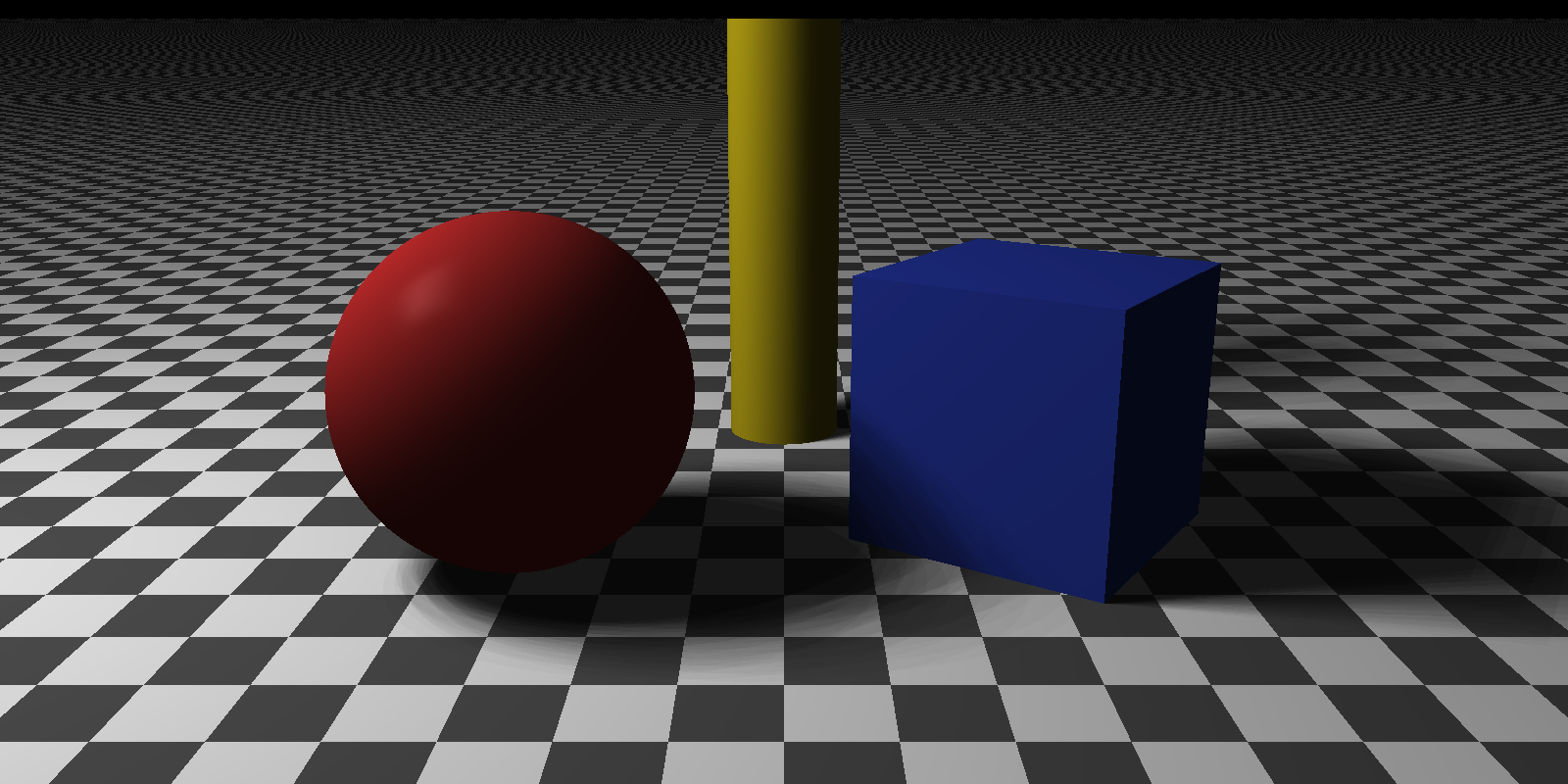
Every pixel here costs 36 shadow rays, and the render took several minutes on 20 cores.
A spotlight
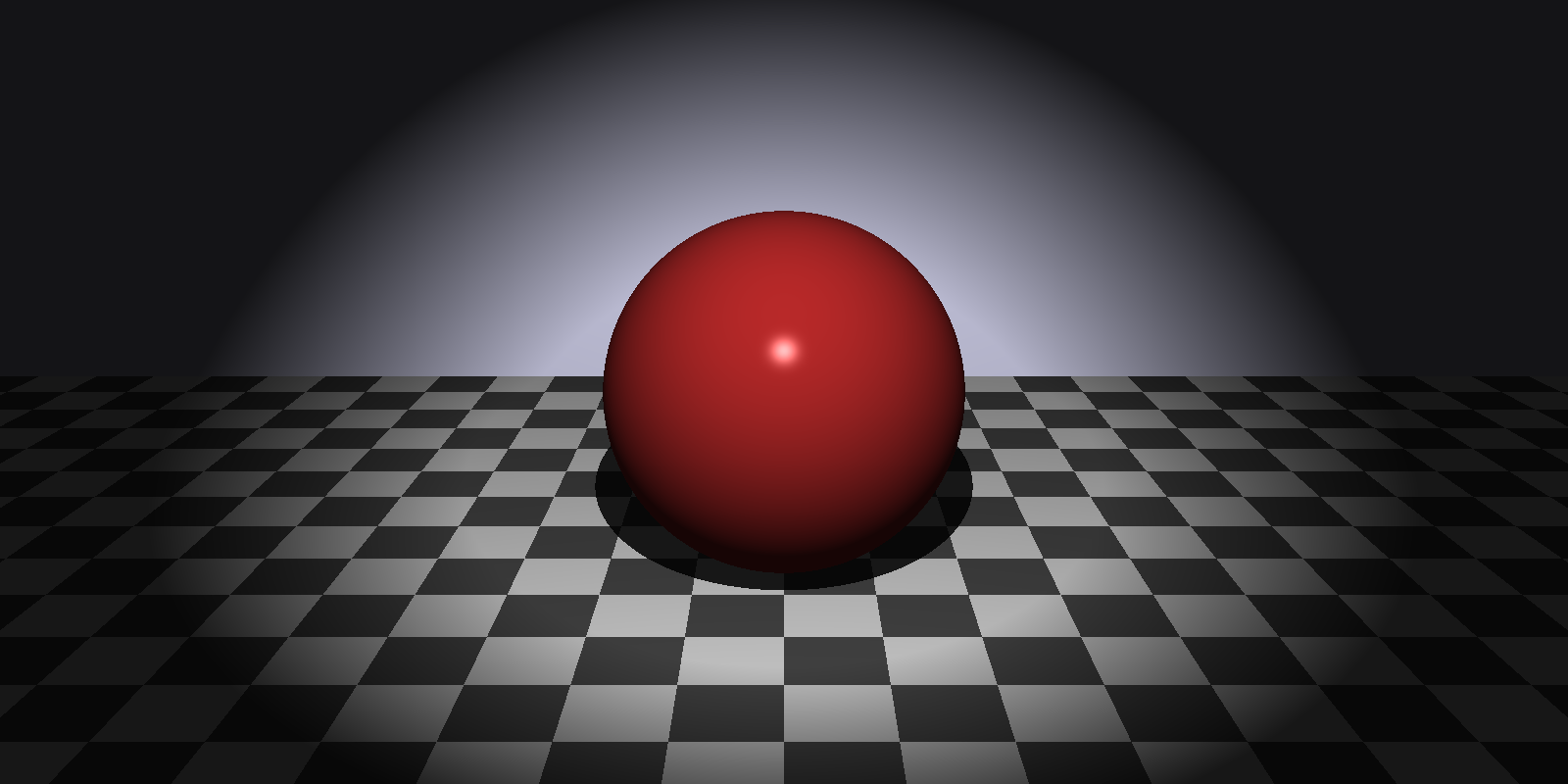
A spotlight above and in front of a ball, aimed at its middle: full light inside 15°, fading to nothing at 28°. The floor and the wall behind show the pool of light, and the rest of the room only its ambient light.
> tools/prender.sh examples/ch18_spot.patlang
assembled 400x200 from 40 bands
rendered with 18 parallel processes (40 bands) in 289 s wall clock
Anti-aliasing
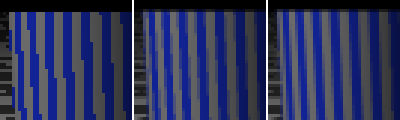
The Boxes, cylinders and cones scene again, three ways. The window below is 44 × 40 pixels around the top left edge of the striped column, enlarged three times with no smoothing: left, one ray per pixel (the committed Boxes, cylinders and cones image); middle, 3 × 3 supersampling; right, adaptive sampling with threshold 1/5 and at most two cuts.
> tools/prender.sh examples/ch18_aa3.patlang
assembled 400x200 from 40 bands
rendered with 18 parallel processes (40 bands) in 2136 s wall clock
> tools/prender.sh examples/ch18_aa_adaptive.patlang
assembled 400x200 from 40 bands
rendered with 18 parallel processes (40 bands) in 1085 s wall clock
> powershell.exe -NoProfile -File tools/zoom.ps1 -Out out/ch18_aa_zoom.png -X 92 -Y 34 -W 44 -H 40 -Scale 3 -In out/ch13_cylinders.png,out/ch18_aa3.png,out/ch18_aa_adaptive.png
wrote out/ch18_aa_zoom.png (400x120)
What each costs, in rays per pixel, over 800 pixels spread across the image:
> cd examples && v2_interp.exe ch18_aa_cost.patlang | grep rays
single ray: 800 rays, 1.00 per pixel
3 x 3 supersampling: 7200 rays, 9.00 per pixel
adaptive (2 cuts, threshold 1/5): 6064 rays, 7.58 per pixel
Adaptive sampling spends its extra rays where the picture changes (edges, the fine stripes on the column, the checkered floor near the horizon) and 5 rays on a flat pixel. In this scene so much of the picture is fine texture that it casts nearly as many rays as the regular grid; a scene of large flat areas would gain more.
Checking it independently
The recursive tracer learned all of this: area-light samples (computed again from the
jitter formula), the spotlight's angle by acos, the per-sample shadow rays, n × n
supersampling, and the adaptive scheme written out again. Each picture is compared with
its own sampling.
Soft shadows (every second pixel in each direction):
> powershell.exe -NoProfile -File tools/verify_recursive.ps1 out/ch18_soft.png -Scene soft -Stride 2
decoded by .NET: 400x200; pixels differing from the independent recursive tracer by more than 1 level: 0 (max difference 0); stride 2 in each direction, 20000 pixels checked
The spotlight:
> powershell.exe -NoProfile -File tools/verify_recursive.ps1 out/ch18_spot.png -Scene spot -Stride 2
decoded by .NET: 400x200; pixels differing from the independent recursive tracer by more than 1 level: 0 (max difference 0); stride 2 in each direction, 20000 pixels checked
3 x 3 supersampling (every fourth pixel; each is nine traces):
> powershell.exe -NoProfile -File tools/verify_recursive.ps1 out/ch18_aa3.png -Scene cylinders -Aa 3 -Stride 4
decoded by .NET: 400x200; pixels differing from the independent recursive tracer by more than 1 level: 0 (max difference 0); stride 4 in each direction, 5000 pixels checked
Adaptive sampling (every fourth pixel in each direction):
> powershell.exe -NoProfile -File tools/verify_recursive.ps1 out/ch18_aa_adaptive.png -Scene cylinders -Adaptive 2,0.2 -Stride 4
decoded by .NET: 400x200; pixels differing from the independent recursive tracer by more than 1 level: 0 (max difference 0); stride 4 in each direction, 5000 pixels checked
Negative control: the supersampled picture against the tracer taking one ray per pixel, which it should reject where there are edges:
> powershell.exe -NoProfile -File tools/verify_recursive.ps1 out/ch18_aa3.png -Scene cylinders -Stride 4
decoded by .NET: 400x200; pixels differing from the independent recursive tracer by more than 1 level: 881 (max difference 85); stride 4 in each direction, 5000 pixels checked
How it is checked
> v2_interp.exe tests/run.patlang --node picture/shading --depth 2
[ ok ] Light at a point
[ ok ]   A point light has a place and a colour; a material starts plain and white
[ ok ]   Ambient, diffuse and specular light, against the oracle (six cases)
[ ok ]   Light from behind the surface, or blocked, leaves only the ambient part
[ ok ]   Diffuse light falls off with the cosine of the light's slope
[ ok ]   The highlight is brightest where the eye looks along the reflected light
[ ok ]   Further checks, independent of the code they check
[ ok ]     Cofactor-matrix normal = book's transpose(inverse(M)) normal (8 transforms x 6 points)
[ ok ]     Sandwich reflection = book's  in - n * 2 dot(in, n)  (16 pairs)
[ ok ]     Halving the light intensity halves the diffuse+specular, not the ambient
checks: 8 passed, 0 failed, 0 blocked, 0 skipped, 0 not run
ALL PASSED
> v2_interp.exe tests/run.patlang --node picture/shadows --depth 2
[ ok ] Shadows
[ ok ]   Which of seven points are in shadow, against the oracle
[ ok ]   Something beyond the light casts no shadow towards it
[ ok ]   With shadows switched off nothing is in shadow
[ ok ]   A surface does not shadow itself: points lifted off a ball are lit
[ ok ]   The blocker of a shadow ray is the object in the way; a unit direction points from one point to another
[ ok ]   Further checks, independent of the code they check
[ ok ]     Sqrt(-2 P.Q) equals magnitude(P - Q) on 25 point pairs
[ ok ]     On the axis behind the sphere: in shadow
[ ok ]     Over_point is EPSILON from point
[ ok ]     The shadow search: unit_toward is normalize(q - p) exactly, and which object is tried first (the hint) never changes whether the way is blocked
checks: 9 passed, 0 failed, 0 blocked, 0 skipped, 0 not run
ALL PASSED
> v2_interp.exe tests/run.patlang --node picture/lights --depth 2
[ ok ] Lights and antialiasing
[ ok ]   Lights with a size
[ ok ]     With no jitter each sample sits in the middle of its own cell, and the light's place is its centre
[ ok ]     With jitter each sample stays inside its own cell, and the cells' samples differ in place
[ ok ]     A point sees the share of samples whose way to it is clear, counted independently
[ ok ]     Walking out from under the ball the light seen never falls
[ ok ]     Shading under a size light is the average of shading under a point light at each sample
[ ok ]     A light of one cell is a point light at its middle
[ ok ]     A point whose whole way to the light is clear casts no shadow rays
[ ok ]     A light with a size keeps its corner, cell sides and counts
[ ok ]   Spotlights
[ ok ]     A spotlight: full inside the inner angle (5, 10 degrees)
[ ok ]   Anti-aliasing
[ ok ]     A pixel's centre ray is ray_for_pixel
[ ok ]     4 x 4 supersampling of the edge pixel gives the covered half: 1/2
[ ok ]     Sharing corner rays between neighbouring pixels does not change the picture: a band rendered with adaptive sampling is byte for byte what pixel_color gives pixel by pixel, and it casts far fewer rays on flat areas (a corner and a centre a pixel rather than five)
checks: 16 passed, 0 failed, 0 blocked, 0 skipped, 0 not run
ALL PASSED