Last updated: 2026-11-26
20. Pictures on surfaces: texture and cube maps
For new readers
Pictures on surfaces: a point is mapped to (u, v), on a sphere, a plane, a cylinder, a triangle or the six faces of a cube, and (u, v) to a colour, from a checkerboard or a picture read nearest-pixel or smoothly. A texture map is a pattern, so it goes wherever a pattern can.
Texture Maps
The patterns of Patterns colour a point from its three coordinates: stripes by x,
rings by x and z, checkers by all three. A picture needs something else. A globe
wears a flat map, and the map has to know which point of the sphere is which pixel. That
takes two steps, kept apart so each can be swapped:texture is colour only. bump maps add fake depth
- a mapping turns a point on the surface into a pair
(u, v), each in[0, 1]; - a UV pattern turns
(u, v)into a colour.
texture_map(uv_pattern, mapping) joins them into an ordinary pattern. It takes a
pattern transformation, goes into a material with with_pattern, and is moved from world
space into object space and then pattern space by the machinery Patterns already has.
Step 1 — three mappings
All three work on a point in pattern space: for a unit sphere or cylinder, the surface
point itself. Longitude is measured the way the book does it: u = 0 at the -z axis, a
quarter turn to +x is u = 1/4, +z is 1/2, -x is 3/4.
- Spherical.
ufrom the longitude,vfrom the latitude: the south pole isv = 0, the north polev = 1. - Planar.
uandvarexandzmodulo 1, so the picture tiles across the plane. - Cylindrical.
ufrom the longitude,visymodulo 1: a label wrapped round a can.
Step 2 — UV patterns
uv_checkers(w, h, a, b) cuts [0, 1]² into w × h squares; a square is colour a
where its column and row sum is even. uv_image(canvas) reads the pixel nearest
(u (w − 1), (1 − v)(h − 1)); the flip puts v = 1 on the top row, so a map drawn north
up stays north up. uv_image_smooth(canvas) does the same position and mixes the four
pixels around it, each by how near it is. Nearest is what the book describes and shows
every pixel as a block when it is magnified; smooth removes the blocks.
make a function called longitude_u takes x, z returns u
  # atan2(x, z) runs from -pi to pi: 0 at +z, pi/2 at +x. u = 1 - (theta / 2 pi + 1/2)
  return 1/2 - atan2(x, z) / (2 * (4 * atan(1)))
end

make a function called spherical_map takes p returns uv
  let x = get_x(p)
  let y = get_y(p)
  let z = get_z(p)
  let radius = sqrt(x * x + y * y + z * z)
  if radius == 0 then
    return [0, 1/2]
  end
  return [longitude_u(x, z), 1 - acos(y / radius) / (4 * atan(1))]
end

make a function called planar_map takes p returns uv
  let x = get_x(p)
  let z = get_z(p)
  return [x - floor(x), z - floor(z)]
end

make a function called cylindrical_map takes p returns uv
  let y = get_y(p)
  return [longitude_u(get_x(p), get_z(p)), y - floor(y)]
end

make a function called uv_map takes mapping, p returns uv
  if mapping == "spherical" then
    return spherical_map(p)
  end
  if mapping == "planar" then
    return planar_map(p)
  end
  if mapping == "cube" then
    return cube_uv(cube_face_index(p), p)
  end
  return cylindrical_map(p)
end

make a function called uv_checkers takes w, h, a, b returns uvp
  return ["uv_checkers", w, h, a, b]
end

make a function called uv_image takes img returns uvp
  return ["uv_image", img]
end

make a function called uv_image_smooth takes img returns uvp
  return ["uv_image_smooth", img]
end

# the column or row index nearest f, kept inside 0 .. last: an int
make a function called texel_index takes f, last returns k
  let k = to_int(floor(f + 1/2))
  if k < 0 then
    return 0
  end
  if k > last then
    return last
  end
  return k
end

make a function called uv_pattern_at takes uvp, u, v returns c
  let kind = uvp[0]
  if kind == "uv_checkers" then
    if (floor(u * uvp[1]) + floor(v * uvp[2])) % 2 == 0 then
      return uvp[3]
    end
    return uvp[4]
  end
  let img = uvp[1]
  let w = img[0]
  let h = img[1]
  if kind == "uv_image" then
    return pixel_at(img, texel_index(u * (w - 1), w - 1), texel_index((1 - v) * (h - 1), h - 1))
  end
  # smooth: x and y are positions in pixel units, clamped to the picture; the four
  # pixels around them are mixed by how close each is
  let fx = u * (w - 1)
  let fy = (1 - v) * (h - 1)
  if fx < 0 then
    let fx = 0
  end
  if fx > w - 1 then
    let fx = w - 1
  end
  if fy < 0 then
    let fy = 0
  end
  if fy > h - 1 then
    let fy = h - 1
  end
  # the pixel at or before (fx, fy): ints, to index the picture
  let x0 = to_int(floor(fx))
  let y0 = to_int(floor(fy))
  let x1 = x0
  if x0 < w - 1 then
    let x1 = x0 + 1
  end
  let y1 = y0
  if y0 < h - 1 then
    let y1 = y0 + 1
  end
  let tx = fx - x0
  let ty = fy - y0
  let top = color_add(color_scale(pixel_at(img, x0, y0), 1 - tx), color_scale(pixel_at(img, x1, y0), tx))
  let bottom = color_add(color_scale(pixel_at(img, x0, y1), 1 - tx), color_scale(pixel_at(img, x1, y1), tx))
  return color_add(color_scale(top, 1 - ty), color_scale(bottom, ty))
end

# a pattern: [kind, uv pattern, mapping name, transform, inverse], the layout of the
# other patterns with the uv pattern and mapping where they keep their two colours
make a function called texture_map takes uvp, mapping returns p
  return ["texture_map", uvp, mapping, identity_matrix(), identity_matrix()]
end
pattern_at gains one line, for the kind texture_map. Everything else in the pattern
code is as it was.
Step 3 — reading a picture
A picture comes from a PPM file, the format canvas_to_ppm has been writing since
Colours, the canvas and picture files. The reader accepts the text form (P3) and the binary form (P6), skips
comments, and divides every sample by the file's maximum value. It works on a list of
bytes, never on a String: indexing a String costs its whole length each time, and a 256 ×
128 picture has 98 000 samples. For P6 the data starts after exactly one whitespace
byte, so a first data byte of 10 or 32 is still data, and # in the data is not a comment.
Anything that does not parse, or has too few samples, gives false.
# the index of the first byte at or after i that is not whitespace or a comment
make a function called ppm_skip takes bytes, i returns j
  let n = bytes.length
  let j = i
  while j < n do
    let b = bytes[j]
    if b == 35 then
      while j < n and bytes[j] != 10 do
        let j = j + 1
      end
    elif b == 32 or b == 9 or b == 10 or b == 13 then
      let j = j + 1
    else
      return j
    end
  end
  return j
end

# the unsigned decimal number at or after i (skipping whitespace first):
# [value, index after it], or false if there is none
make a function called ppm_int takes bytes, i returns result
  let j = ppm_skip(bytes, i)
  let n = bytes.length
  if j >= n or bytes[j] < 48 or bytes[j] > 57 then
    return false
  end
  let v = 0
  while j < n and bytes[j] >= 48 and bytes[j] <= 57 do
    let v = v * 10 + (bytes[j] - 48)
    let j = j + 1
  end
  return [v, j]
end

make a function called ppm_from_bytes takes bytes returns img
  if bytes.length < 2 or bytes[0] != 80 or (bytes[1] != 51 and bytes[1] != 54) then
    return false
  end
  let binary = bytes[1] == 54
  let wv = ppm_int(bytes, 2)
  if wv == false then
    return false
  end
  let hv = ppm_int(bytes, wv[1])
  if hv == false then
    return false
  end
  let mv = ppm_int(bytes, hv[1])
  if mv == false then
    return false
  end
  let w = wv[0]
  let h = hv[0]
  let maxval = mv[0]
  if w < 1 or h < 1 or maxval < 1 then
    return false
  end
  let i = mv[1]
  let count = w * h * 3
  if binary then
    # one whitespace byte ends the header; everything after it is data, whatever its value
    if maxval > 255 or i >= bytes.length or bytes.length - (i + 1) < count then
      return false
    end
    let i = i + 1
  end
  let img = canvas(w, h)
  let k = 0
  let rgb = [0, 0, 0]
  while k < count do
    let s = 0
    if binary then
      let s = bytes[i]
      let i = i + 1
    else
      let tv = ppm_int(bytes, i)
      if tv == false then
        return false
      end
      let s = tv[0]
      let i = tv[1]
    end
    let rgb = list_set(rgb, k % 3, s / maxval)
    if k % 3 == 2 then
      let p = floor(k / 3)
      write_pixel(img, p % w, floor(p / w), color(rgb[0], rgb[1], rgb[2]))
    end
    let k = k + 1
  end
  return [w, h, vec_to_list(img[2])]
end

# a binary PPM is read a row at a time (a picture of a million pixels as one list of bytes would take 200 MB); the
# result is the same canvas ppm_from_bytes makes. false if the file is not a P6 whole enough to read this way.
make a function called read_ppm_rows takes path, head returns img
  if head.length < 10 or head[0] != 80 or head[1] != 54 then
    return false
  end
  let wv = ppm_int(head, 2)
  if wv == false then
    return false
  end
  let hv = ppm_int(head, wv[1])
  if hv == false then
    return false
  end
  let mv = ppm_int(head, hv[1])
  if mv == false then
    return false
  end
  let w = wv[0]
  let h = hv[0]
  let maxval = mv[0]
  if w < 1 or h < 1 or maxval < 1 or maxval > 255 or mv[1] >= head.length then
    return false
  end
  let start = mv[1] + 1
  # the samples, three a pixel, row after row, as a list: a picture is only read, and a list (unlike the vec handle of a canvas
  # being drawn on) can be read by every thread of a threaded render
  let store = []
  let y = 0
  while y < h do
    let row = read_file_bytes(path, start + y * w * 3, w * 3)
    if row.length != w * 3 then
      return false
    end
    let k = 0
    while k < w * 3 do
      let store = list_push(store, row[k] / maxval)
      let k = k + 1
    end
    let y = y + 1
  end
  return [w, h, store]
end
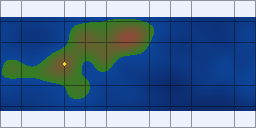
The picture used below is made by tools/make_texture.patlang, an invented planet built
from a function of the point on the sphere (so the land has no seam and no pinching at
the poles), with a graticule every 30° and a yellow dot on the equator where
spherical_map sends (1, 0, 0). The dot makes the orientation of any mapping visible.
> (cd tools && v2_interp.exe make_texture.patlang)
wrote textures/globe.ppm 256x128
Step 4 — scenarios and oracles
- Worked cases. A 4 × 2 checkerboard over the unit square; the spherical map at the poles, along the axes and 45 degrees up, and unchanged by distance from the centre; the planar map wrapping positive and negative coordinates; the cylindrical map round the axis and up its height; a triangle's corners and centroid; a texture map as a pattern is the mapping followed by the uv pattern.
- The reader against the numbers in
tests/data/tiny.ppm, a 4 × 3 picture with a comment on the size line, one between rows and its samples spread over several lines; a maximum value of 15;P6bytes, including data bytes that look like whitespace and#; a wrong magic number, a missing size and truncated data (allfalse). - An image texture gives each pixel back at its own
(u, v); the nearest pixel elsewhere; with smoothing, the mean of two pixels halfway between them, of four at the centre of four, the 3 : 1 mix at a quarter, and the edges clamped. - Turning the point. A turn about the
yaxis bya, done here in plain arithmetic on 40 points spread over a sphere, movesuby exactlya / 2πand leavesvalone, for the spherical and the cylindrical maps. Shifting by whole units inxandzchanges nothing in the planar map. - In a world. Rays at a lit sphere (ambient 1, no other light, so the colour of a hit is the colour of the texture) against a hand-written longitude and latitude formula applied to the hit point, on 48 rays, skipping any within a thousandth of a square's edge; the same on a sphere turned a quarter turn, which carries its texture with it; a pattern transformation that applies before the map.
- Negative controls: flipping
vpicks another pixel; nearest sampling is not the smooth mean; a planar map is not turn-invariant; a cylindrical map on a sphere gives other colours.
Step 5 — Putting it together
A globe wearing the picture with smoothing, a ball in 20 × 10 UV checkers, a can wearing the same picture with nearest sampling, a floor in planar checkers, and a wall that the picture is stretched over by a planar map and tiled beyond. The yellow dot faces the camera on the globe.
# chapter 20: three implicit surfaces on a checkered floor in front of a wall: a heart
# (a degree 9 polynomial), Barth's sextic cut to a ball, and the rounded block
# x^4 + y^4 + z^4 = 1 dished by a ball (a CSG difference with an implicit operand)
make a function called build_implicit_scene returns w
  let floor_m = with_pattern(material_with(color(1, 1, 1), (1/10), (9/10), 0, 200), set_pattern_transform(checkers_pattern(color((9/10), (9/10), (9/10)), color((3/10), (3/10), (3/10))), scaling((1/2), (1/2), (1/2))))
  let floor_p = set_material(plane(), floor_m)
  let back = set_material(set_transform(plane(), mat_mul(translation(0, 0, 4), rotation_x(pi() / 2))), material_with(color((8/10), (8/10), (9/10)), (1/10), (9/10), 0, 200))
  let heart_m = with_reflective(material_with(color((9/10), (1/10), (1/10)), (1/10), (7/10), (6/10), 150), (1/10))
  let heart = set_material(implicit(heart_surface(), [[(-13/10), (-11/10), (-8/10)], [(13/10), (13/10), (8/10)]]), heart_m)
  let heart = set_transform(heart, mat_mul(translation(-(5/2), (9/10), 0), mat_mul(rotation_y((1/5)), scaling((9/10), (9/10), (9/10)))))
  let barth_m = with_reflective(material_with(color((1/5), (3/10), (9/10)), (1/10), (7/10), (6/10), 150), (1/10))
  let barth = csg("intersection", implicit(barth_sextic(), [[(-8/5), (-8/5), (-8/5)], [(8/5), (8/5), (8/5)]]), sphere())
  let barth = with_material_deep(set_transform(barth, mat_mul(translation(0, (23/20), 0), scaling((9/10), (9/10), (9/10)))), barth_m)
  let gold = with_reflective(material_with(color((9/10), (7/10), (1/10)), (1/10), (6/10), (7/10), 200), (1/5))
  let block = implicit(quartic_surface(), [[(-11/10), (-11/10), (-11/10)], [(11/10), (11/10), (11/10)]])
  let dish = csg("difference", block, set_transform(sphere(), mat_mul(translation(0, 0, -(6/5)), scaling((9/10), (9/10), (9/10)))))
  let dish = with_material_deep(set_transform(dish, mat_mul(translation((5/2), (4/5), 0), mat_mul(rotation_y((4/10)), scaling((4/5), (4/5), (4/5))))), gold)
  return [[floor_p, back, heart, barth, dish], demo_light(), true]
end
> tools/prender.sh examples/ch21_textures.patlang
assembled 400x200 from 40 bands
rendered with 9 parallel processes (40 bands) in 273 s wall clock
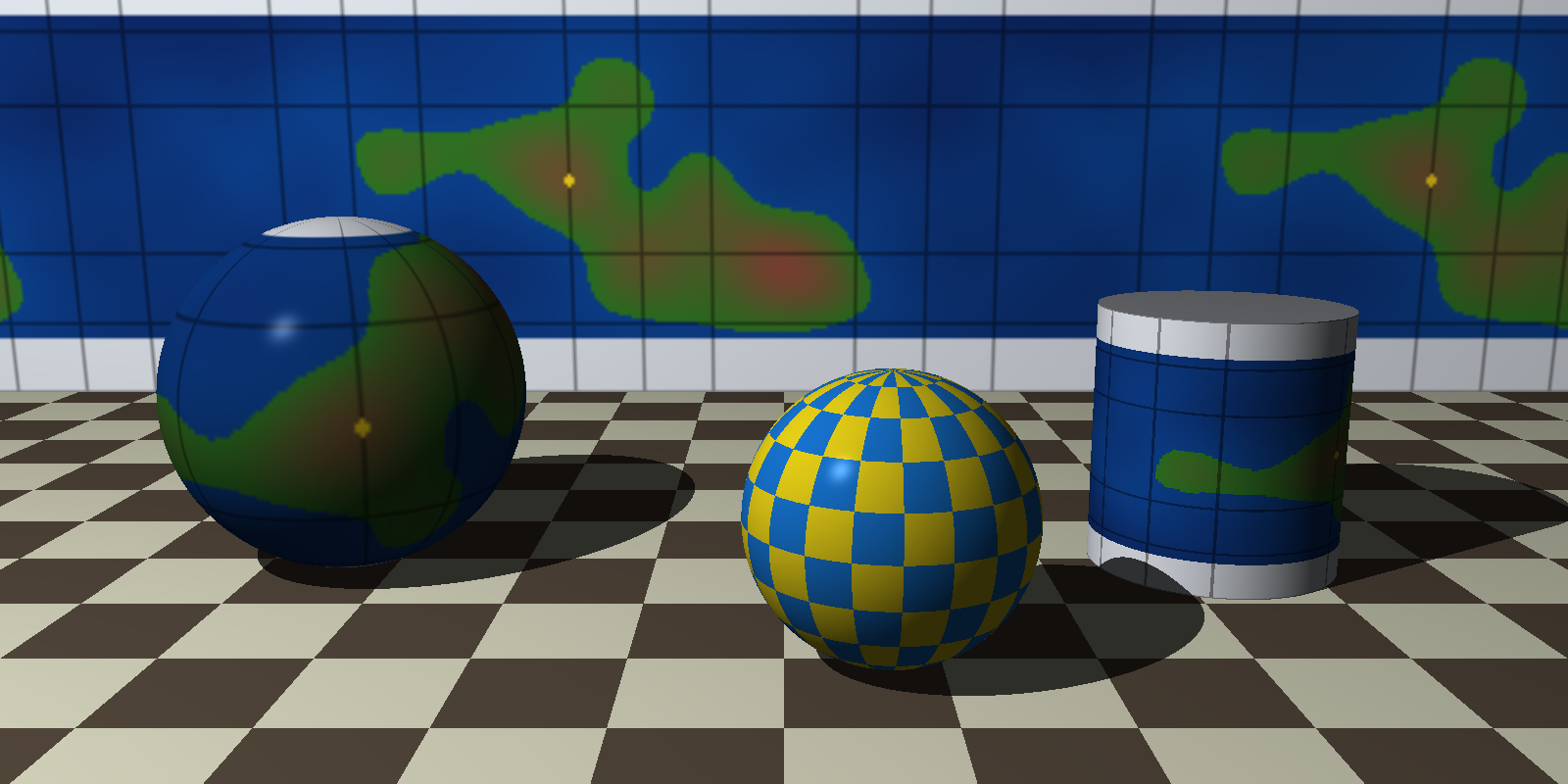
The wall is the same picture as the globe, so the two show how the planar and spherical maps treat it; the can shows the blocky nearest-pixel sampling next to the globe's smooth one.
Checking it independently
The recursive tracer reads the scene from the exporter of Built objects: solid geometry and a Dalek, which now writes a
U line for a texture map: the mapping, the UV pattern, and the matrix of the pattern.
The tracer reads the picture with a PPM reader of its own, and maps points with different
formulas: the longitude by atan2(x, −z) and the latitude by asin(y / r), where the
library measures the angle from +z and takes acos. Nearest and smooth sampling are
written again from their definitions.
> v2_interp.exe tools/export_scene.patlang --scene texture --out out/texture_scene.txt
wrote out/texture_scene.txt (5 shapes)
> powershell.exe -NoProfile -File tools/verify_recursive.ps1 out/ch21_textures.png -SceneFile out/texture_scene.txt -Stride 4
decoded by .NET: 400x200; pixels differing from the independent recursive tracer by more than 1 level: 0 (max difference 0); stride 4 in each direction, 5000 pixels checked
Negative controls: the same picture against the Dalek's scene, and against this scene with
one object's texture changed (made with sed, below), the globe's mapping to cylindrical and then the can's sampling
to smooth:
sed 's/^U 2 spherical/U 2 cylindrical/' out/texture_scene.txt > out/texture_scene_wrong.txt
sed 's/^U 4 cylindrical image nearest/U 4 cylindrical image smooth/' out/texture_scene.txt > out/texture_scene_wrong2.txt
> powershell.exe -NoProfile -File tools/verify_recursive.ps1 out/ch21_textures.png -SceneFile out/dalek_front.txt -Stride 8
decoded by .NET: 400x200; pixels differing from the independent recursive tracer by more than 1 level: 1249 (max difference 217); stride 8 in each direction, 1250 pixels checked
> powershell.exe -NoProfile -File tools/verify_recursive.ps1 out/ch21_textures.png -SceneFile out/texture_scene_wrong.txt -Stride 4
decoded by .NET: 400x200; pixels differing from the independent recursive tracer by more than 1 level: 356 (max difference 188); stride 4 in each direction, 5000 pixels checked
> powershell.exe -NoProfile -File tools/verify_recursive.ps1 out/ch21_textures.png -SceneFile out/texture_scene_wrong2.txt -Stride 4
decoded by .NET: 400x200; pixels differing from the independent recursive tracer by more than 1 level: 42 (max difference 34); stride 4 in each direction, 5000 pixels checked
No other picture in the repository changed: the benchmark suite of the performance chapter gives the checksums it did before this page.
A Dalek on a lawn
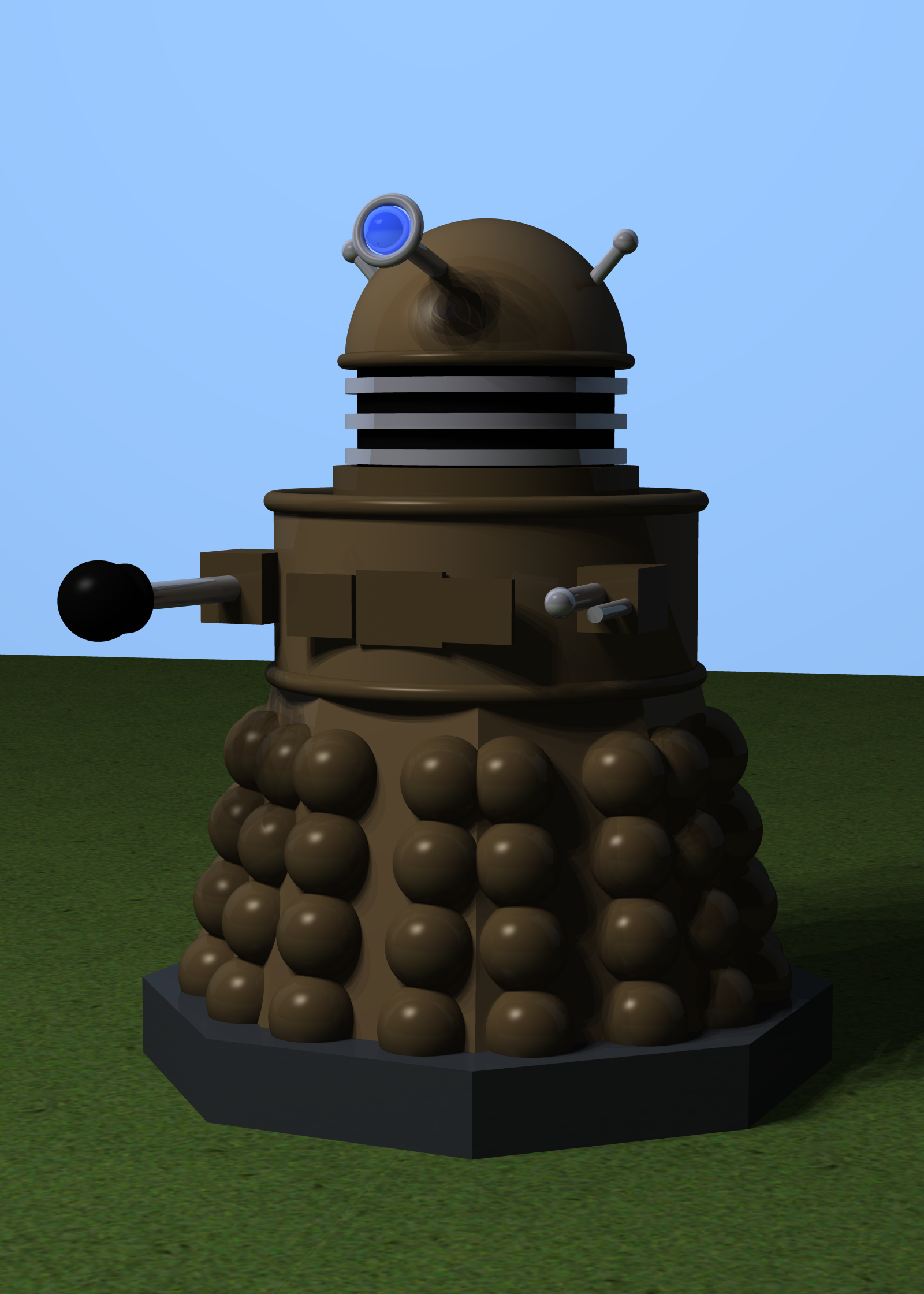
The Dalek of Built objects: solid geometry and a Dalek stood on a reflective floor. For a lawn we need a picture of
grass, and drawing one is beyond the little generator above, so this one is real: the
colour map of "Grass001" from ambientCG, which publishes its textures under the CC0
licence (public domain). tools/make_grass.ps1 reduces the 1024 × 1024 JPEG to a
256 × 256 binary PPM, textures/grass.ppm, using .NET only to decode the JPEG; from there
the library's own reader takes over. The size is a cost choice: every band process reads
the file at start-up, so a smaller picture keeps that cost down.
The floor is a plane with a planar map, smoothed, one tile every 1.5 units, and no reflection; the wall far behind is a pale sky blue.
# the cameras: a window `width` pixels wide and 1.4 times as tall, looking from `view`:
# "front" (a little to the right of the Dalek, slightly above) or "side" (from its
# plunger-arm side, lower down)
make a function called dalek_view_points takes view returns pts
  if view == "side" then
    return [-(33/10), (9/10), -(35/10), 0, (88/100), 0, (55/100)]
  end
  return [(11/10), (13/10), -(48/10), -(1/20), (85/100), 0, (13/25)]
end
The same adaptive anti-aliasing and camera as the Built objects: solid geometry and a Dalek front view, 400 × 560:
> tools/prender.sh examples/ch21_dalek_lawn.patlang 112
assembled 400x560 from 112 bands
rendered with 9 parallel processes (112 bands) in 26102 s wall clock
Checked against the independent tracer as in Built objects: solid geometry and a Dalek (the exporter's --scene lawn,
the same adaptive sampling, every 16th pixel in each direction), with the Dalek's old
scene as the negative control:
> v2_interp.exe tools/export_scene.patlang --scene lawn --view front --out out/lawn_front.txt
wrote out/lawn_front.txt (244 shapes)
> powershell.exe -NoProfile -File tools/verify_recursive.ps1 out/ch21_dalek_lawn.png -SceneFile out/lawn_front.txt -Adaptive 1,0.15 -Stride 16
decoded by .NET: 400x560; pixels differing from the independent recursive tracer by more than 1 level: 0 (max difference 0); stride 16 in each direction, 875 pixels checked
> powershell.exe -NoProfile -File tools/verify_recursive.ps1 out/ch21_dalek_lawn.png -SceneFile out/dalek_front.txt -Adaptive 1,0.15 -Stride 16
decoded by .NET: 400x560; pixels differing from the independent recursive tracer by more than 1 level: 713 (max difference 191); stride 16 in each direction, 875 pixels checked
Cube Mapping
A sphere has a natural (u, v), a plane and a cylinder do too, but a cube is six flat
squares, and the usual way to dress one is six pictures, one a face. The same trick wraps
a picture round a sphere by the direction of each point from the centre, which is how a
sky box or an environment picture works.
A cube map takes a point of the cube round the origin, finds the face the point is on,
and reads the picture of that face at the (u, v) of the point within it.
Which face, and where on it
The face is the axis along which the point is farthest out (ties go to x, then y, then
z): left (x = −1), front (z = −1, the face the default camera sees), right (x = +1),
back (z = +1), up (y = +1) and down (y = −1).
The picture of each face is laid so that it reads correctly from outside the cube. Stand
outside, look at the face with +y up (for the top face, +z is up; for the bottom, −z) and
u grows to your right, v grows upward. Laid flat as a cross, front, right, back and left
run in a row, up and down sit above and below front, and every edge between two faces lines
up. Written face by face, (u, v) is:
| face | u | v |
|---|---|---|
| left | (1 − z) / 2 | (y + 1) / 2 |
| front | (x + 1) / 2 | (y + 1) / 2 |
| right | (z + 1) / 2 | (y + 1) / 2 |
| back | (1 − x) / 2 | (y + 1) / 2 |
| up | (x + 1) / 2 | (z + 1) / 2 |
| down | (x + 1) / 2 | (1 − z) / 2 |
cube_map(left, front, right, back, up, down) takes six UV patterns (checkers or pictures,
nearest or smoothed), so a face can be a flat colour, a checker, or a photograph. A bump
or normal map works with it too: the tangent frame of a face is its right and up directions.tangent frame is local right and up vectors
# ---- cube mapping ----
#
# Six pictures on the faces of the cube round the origin (a point's face is the axis
# along which it is farthest out; ties go to x, then y, then z). The faces are numbered
# 0 left (x = -1), 1 front (z = -1, the one the default camera sees), 2 right (x = +1),
# 3 back (z = +1), 4 up (y = +1), 5 down (y = -1), the order of cube_map. Each picture reads
# correctly seen from OUTSIDE the cube: a viewer looking at the face, with +y up (the top
# face: +z up, the bottom face: -z up), sees u grow to the right and v upward. Laid flat
# as a cross, front-right-back-left run in a row and up and down sit above and below front,
# and every edge between two faces lines up.
make a function called cube_face_index takes p returns f
  let x = get_x(p)
  let y = get_y(p)
  let z = get_z(p)
  let m = abs(x)
  if abs(y) > m then
    let m = abs(y)
  end
  if abs(z) > m then
    let m = abs(z)
  end
  if abs(x) == m then
    if x > 0 then
      return 2
    end
    return 0
  end
  if abs(y) == m then
    if y > 0 then
      return 4
    end
    return 5
  end
  if z > 0 then
    return 3
  end
  return 1
end

# [u, v] of the point on the picture of face f
make a function called cube_uv takes f, p returns uv
  let x = get_x(p)
  let y = get_y(p)
  let z = get_z(p)
  if f == 0 then
    return [(1 - z) / 2, (y + 1) / 2]
  end
  if f == 1 then
    return [(x + 1) / 2, (y + 1) / 2]
  end
  if f == 2 then
    return [(z + 1) / 2, (y + 1) / 2]
  end
  if f == 3 then
    return [(1 - x) / 2, (y + 1) / 2]
  end
  if f == 4 then
    return [(x + 1) / 2, (z + 1) / 2]
  end
  return [(x + 1) / 2, (1 - z) / 2]
end

# six UV patterns, as a pattern
make a function called cube_map takes left, front, right, back, up, down returns p
  return ["texture_map", ["uv_cube", [left, front, right, back, up, down]], "cube", identity_matrix(), identity_matrix()]
end
Scenarios and oracles
- Face by name. The centre of each face has that face's colour; rays from outside along
−x, −z, +x, +z, +y, −yat a unit cube see left, front, right, back, up and down. - An orientation oracle. On every face, a small step to the viewer's right raises
uand notv, a step up raisesvand notu, and (right × up) points into the cube: the viewer looks inward, so no picture is mirrored. - The basis form.
uandvof 60 points on each face (360) equal(p · right + 1)/2and(p · up + 1)/2with the viewer's right and up worked out by a cross product, and each point is assigned the right face. The closed forms of the table and the basis form share nothing but the geometry. - Continuity. At nine points along each of six edges of the unfolded cross, the two faces'
positions in their pictures meet:
u = 1of one isu = 0of the next, with the samev. - A marked corner. A 2 × 2 picture with only its top-left pixel red, on each face: the red corner is where the viewer outside sees the top left.
- Bump frames: against numerical derivatives of the mapping, as for the other mappings.
- Negative control: the opposite corner of the front face is not red.
Putting it together
Six pictures, each a capital letter in its own colour with a black square at the top left
(tools/make_cubemap.patlang), so a face that is mirrored, turned or swapped is visible at once:
> (cd tools && v2_interp.exe make_cubemap.patlang)
wrote textures/cube_{left,front,right,back,up,down}.ppm, 64x64

A cube wearing them, and a sphere wearing them by direction, on a checkered floor:
# chapter 24: a cube mapping. `faces` is the six pictures [left, front, right, back, up, down]
# (canvases). A cube wearing them, one picture per face, and a sphere wearing them by the
# direction of each of its points, on a checkered floor.
make a function called build_cube_map_scene takes faces returns w
  let matte = material_with(color(1, 1, 1), (3/10), (7/10), (1/10), 50)
  let pat = cube_map(uv_image_smooth(faces[0]), uv_image_smooth(faces[1]), uv_image_smooth(faces[2]), uv_image_smooth(faces[3]), uv_image_smooth(faces[4]), uv_image_smooth(faces[5]))
  let floor_m = with_pattern(material_with(color(1, 1, 1), (1/10), (9/10), 0, 200), set_pattern_transform(checkers_pattern(color((9/10), (9/10), (9/10)), color((3/10), (3/10), (3/10))), scaling((3/2), (3/2), (3/2))))
  let floor_p = set_material(plane(), floor_m)
  let box = set_material(set_transform(cube(), mat_mul(translation(-(8/5), 1, 0), rotation_y((2/5)))), with_pattern(matte, pat))
  let ball = set_material(set_transform(sphere(), mat_mul(translation((9/5), 1, 0), rotation_y((4/5)))), with_pattern(matte, pat))
  return [[floor_p, box, ball], point_light(point(-6, 8, -6), color(1, 1, 1)), true]
end
> tools/prender.sh examples/ch24_cube_map.patlang
assembled 400x200 from 40 bands
rendered with 9 parallel processes (40 bands) in 142 s wall clock
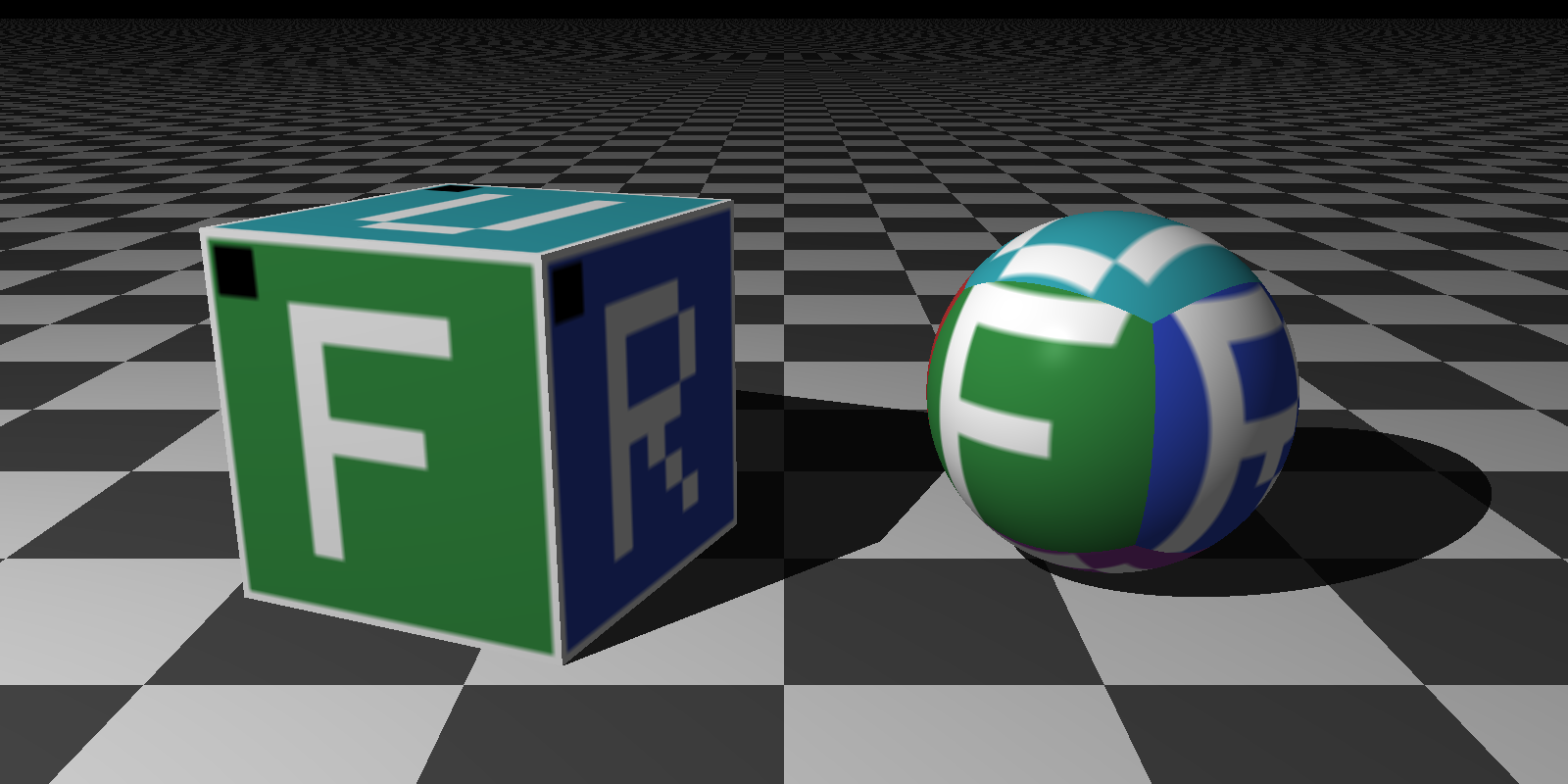
The F, the R and (on top) the U all read correctly, and the sphere shows the same six pictures seen along its radii.
Checking it independently
The exporter writes the six pictures after the word cube. The independent tracer picks the
face and finds u and v from the same oriented-viewer description as the oracle above,
right = up × look, with its own picture reader.
> v2_interp.exe tools/export_scene.patlang --scene cubemap --out out/cubemap_scene.txt
wrote out/cubemap_scene.txt (3 shapes)
> powershell.exe -NoProfile -File tools/verify_recursive.ps1 out/ch24_cube_map.png -SceneFile out/cubemap_scene.txt -Stride 4
decoded by .NET: 400x200; pixels differing from the independent recursive tracer by more than 1 level: 0 (max difference 0); stride 4 in each direction, 5000 pixels checked
Negative controls: the same picture against the Pictures on surfaces: texture and cube maps scene, and against this scene with the front picture replaced by the back one:
sed 's/textures\/cube_front.ppm/textures\/cube_back.ppm/' out/cubemap_scene.txt > out/cubemap_scene_wrong.txt
> powershell.exe -NoProfile -File tools/verify_recursive.ps1 out/ch24_cube_map.png -SceneFile out/texture_scene.txt -Stride 8
decoded by .NET: 400x200; pixels differing from the independent recursive tracer by more than 1 level: 1250 (max difference 245); stride 8 in each direction, 1250 pixels checked
> powershell.exe -NoProfile -File tools/verify_recursive.ps1 out/ch24_cube_map.png -SceneFile out/cubemap_scene_wrong.txt -Stride 4
decoded by .NET: 400x200; pixels differing from the independent recursive tracer by more than 1 level: 596 (max difference 201); stride 4 in each direction, 5000 pixels checked
How it is checked
> v2_interp.exe tests/run.patlang --node surfaces/textures --depth 2
[ ok ] Pictures on surfaces
[ ok ]   From a point to (u, v)
[ ok ]     On a sphere: u goes round from -z through +x, v from the south pole up
[ ok ]     Only the direction from the centre matters
[ ok ]     On a plane: x and z, each wrapped into [0, 1)
[ ok ]     On a cylinder: u round as on a sphere, v the height wrapped
[ ok ]     On a triangle: the corners' (u, v), blended by where the point is
[ ok ]     uv_map picks the mapping by its name
[ ok ]   From (u, v) to a colour
[ ok ]     A 4 x 2 checkerboard over the unit square
[ ok ]     A picture read at its nearest pixel; v = 1 is the top row
[ ok ]     Read smoothly, a picture gives its pixels at their centres and blends between them
[ ok ]   Nearest and smooth reading at the pixels themselves  (all, giving the same answer)
[ ok ]     nearest pixel
[ ok ]     smooth blend
[ ok ]   A texture map is a pattern: the mapping, then the uv pattern
[ ok ]   Cube maps
[ ok ]     A point belongs to the face its largest coordinate points at
[ ok ]     The middle of each face is the middle of its picture
[ ok ]     The four side pictures join edge to edge round the cube, and the top and bottom meet the front's edges
[ ok ]     Each face shows its own picture
[ ok ]     Further checks, independent of the code they check
[ ok ]   Further checks, independent of the code they check
[ ok ]     The file read is a canvas of 4 x 3
[ ok ]     Maxval 15: 15 is 1 and 0 is 0, 7 is 7/15
[ ok ]     Uv_image gives every pixel at its own (u, v); v = 1 is the top row
[ ok ]     Smooth: at texel (u, v) the pixel itself
[ ok ]     Spherical: a turn about y by a moves u by a / 2 pi and not v (40 points)
[ ok ]     Rays at a sphere: the colour is the checker at the formula's (u, v)
checks: 28 passed, 0 failed, 0 blocked, 0 skipped, 0 not run
ALL PASSED