Last updated: 2026-11-26
19. Patterns
For new readers
The colour of a surface at a point, when it is not plain: stripes, gradients, rings and checkers, each with its own transform on top of the shape's. Light at a point asks for this colour; texture maps on the next page are patterns too.
Patterns
A pattern is a rule that turns a point into a colour: stripes, a gradient, rings and checkers. The pattern has its own transformation, applied after the object's, so a pattern follows its object and can also be scaled, rotated or shifted independently of it.
Step 1 — a pattern is a point-to-colour map with a transform
The record is [kind, a, b, transform, inverse], and pattern_at(pattern, point)
works in pattern space. pattern_at_shape takes a world point and does
what the book's pseudocode does: undo the shape's transformation to reach object
space, then undo the pattern's to reach pattern space, with the same
mat_tuple-by-inverse machinery used for rays and normals.
| pattern | rule at (x, y, z) |
|---|---|
| stripe | a if ⌊x⌋ is even, else b |
| gradient | a + (b − a)(x − ⌊x⌋) |
| ring | a if ⌊√(x² + z²)⌋ is even, else b |
| checkers | a if ⌊x⌋ + ⌊y⌋ + ⌊z⌋ is even, else b |
| test | the point's coordinates as a colour |
Where the algebra shows: the gradient is colour-vector algebra, a + (b − a)·f
with the color_add/color_sub/color_scale of Colours, the canvas and picture files, and every point
conversion is the conformal tuple machinery of the the pages it builds on. The
patterns themselves are rules on coordinates, and the code says so rather than
dressing them up.
make a function called make_pat takes kind, a, b returns p
  return [kind, a, b, identity_matrix(), identity_matrix()]
end

make a function called stripe_pattern takes a, b returns p
  return make_pat("stripe", a, b)
end

make a function called gradient_pattern takes a, b returns p
  return make_pat("gradient", a, b)
end

make a function called ring_pattern takes a, b returns p
  return make_pat("ring", a, b)
end

make a function called checkers_pattern takes a, b returns p
  return make_pat("checkers", a, b)
end

make a function called test_pattern returns p
  return make_pat("test", color(0, 0, 0), color(0, 0, 0))
end

make a function called pattern_a takes p returns c
  return p[1]
end

make a function called pattern_b takes p returns c
  return p[2]
end

make a function called pattern_transform takes p returns m
  return p[3]
end

# returns a new pattern (values are not mutated in place)
make a function called set_pattern_transform takes p, m returns p2
  return [p[0], p[1], p[2], m, inverse(m)]
end

make a function called pattern_at takes p, pt returns c
  let kind = p[0]
  if kind == "texture_map" then
    return texture_pattern_at(p, pt)
  end
  let x = get_x(pt)
  if kind == "test" then
    return color(x, get_y(pt), get_z(pt))
  end
  if kind == "gradient" then
    return color_add(p[1], color_scale(color_sub(p[2], p[1]), x - floor(x)))
  end
  let parity = 0
  if kind == "stripe" then
    let parity = floor(x) % 2
  end
  if kind == "ring" then
    let parity = floor(sqrt(x * x + get_z(pt) * get_z(pt))) % 2
  end
  if kind == "checkers" then
    let parity = (floor(x) + floor(get_y(pt)) + floor(get_z(pt))) % 2
  end
  if parity == 0 then
    return p[1]
  end
  return p[2]
end

make a function called pattern_at_shape takes p, shape, world_point returns c
  return pattern_at(p, mat_tuple(p[4], world_to_object(shape, world_point)))
end
Step 2 — lighting takes the object
The material gains a pattern field (default none), and lighting takes the
object as a second argument so it can evaluate pattern_at_shape at the point
being shaded. shade_hit passes the hit's object. (The book evaluates the
pattern at over_point, as here.) Every earlier call to lighting gained the
extra argument and the earlier suites still pass.
make a function called lighting takes m, object, light, p, eyev, normalv, in_shadow returns c
  return lighting_color(m, surface_color(m, object, p), light, p, eyev, normalv, in_shadow)
end
Step 3 — checks
Stripes change at every whole x; a gradient blends across each unit and starts again;
rings change with the distance from the y axis; checkers flip across every whole x, y
and z (on random points, moving one unit along any axis flips the colour and moving
two does not); a pattern is read in its own space, after the object's transform and its
own; and a patterned material is lit with the pattern's colour at the point.
Further checks, sharing no code with what they check:
- a plain-arithmetic oracle: for a scale-and-translate object transform and
a scale-and-translate pattern transform,
pattern_at_shapeis compared with inverting both by hand ((p − t)/s) and applying the rule, for all four patterns on a grid of 120 points each; - symmetries: a ring is unchanged when a CGA rotor rotates the point about the y axis (a rotation of the conformal point, away from ring boundaries); checkers repeat with period 2 and flip under a shift of 1 in each axis; a gradient repeats with period 1 in x. A negative control — a ring point rotated about the x axis changes ring — shows the symmetry test can fail;
- through the world: a patterned plane lit with ambient 1 returns the stripe colour under the ray, red on one stripe and blue on the next.
Step 4 — Putting it together
A checkered plane floor (checks scaled by 2), a striped backdrop plane (rotated and scaled stripes), and the three balls of the camera page: rings on the big resting ball (rotated π/2 about x so the rings face the camera), a gradient on the hovering one, and small checks on the little one.
# patterns: a checkered plane floor, a striped backdrop, and the three balls
# wearing a ring, a gradient and a small checker pattern
make a function called build_pattern_scene returns w
  let floor_m = with_pattern(material_with(color(1, 1, 1), (1/10), (9/10), 0, 200), set_pattern_transform(checkers_pattern(color((9/10), (9/10), (9/10)), color((3/10), (3/10), (3/10))), scaling(2, 2, 2)))
  let floor_p = set_material(plane(), floor_m)
  let back_m = with_pattern(material_with(color(1, 1, 1), (1/10), (9/10), 0, 200), set_pattern_transform(stripe_pattern(color((9/10), (1/5), (2/5)), color((7/10), (7/10), (7/10))), mat_mul(rotation_y(pi() / 5), scaling((3/5), (3/5), (3/5)))))
  let backdrop = set_material(set_transform(plane(), mat_mul(translation(0, 0, 6), rotation_x(pi() / 2))), back_m)
  let sp = demo_spheres()
  let ring_m = with_pattern(shape_material(sp[0]), set_pattern_transform(ring_pattern(color((1/10), 1, (1/2)), color((3/100), (2/5), (1/5))), mat_mul(rotation_x(pi() / 2), scaling((3/10), (3/10), (3/10)))))
  let grad_m = with_pattern(shape_material(sp[1]), set_pattern_transform(gradient_pattern(color(1, (1/5), (1/10)), color(1, (9/10), (1/5))), mat_mul(translation(-1, 0, 0), scaling(2, 2, 2))))
  let chk_m = with_pattern(shape_material(sp[2]), set_pattern_transform(checkers_pattern(color(1, (4/5), (1/10)), color((2/5), (1/4), (1/20))), scaling((1/4), (1/4), (1/4))))
  return [[floor_p, backdrop, set_material(sp[0], ring_m), set_material(sp[1], grad_m), set_material(sp[2], chk_m)], spheres_light(), true]
end
# Chapter 10, "Putting It Together": all four patterns on planes and spheres,
# each with its own pattern transformation, at 200x100.
include "../lib/spec.patlang"
include "../lib/png.patlang"
include "../lib/camera.patlang"
include "../lib/demo_scene.patlang"

let w = build_pattern_scene()
let cam = set_camera_transform(camera(400, 200, pi() / 3), view_transform(spheres_view()[0], spheres_view()[1], vector(0, 1, 0)))
render_example(cam, w, "../out/ch10_patterns.png")
> tools/prender.sh examples/ch10_patterns.patlang
assembled 400x200 from 40 bands
rendered with 9 parallel processes (40 bands) in 305 s wall clock
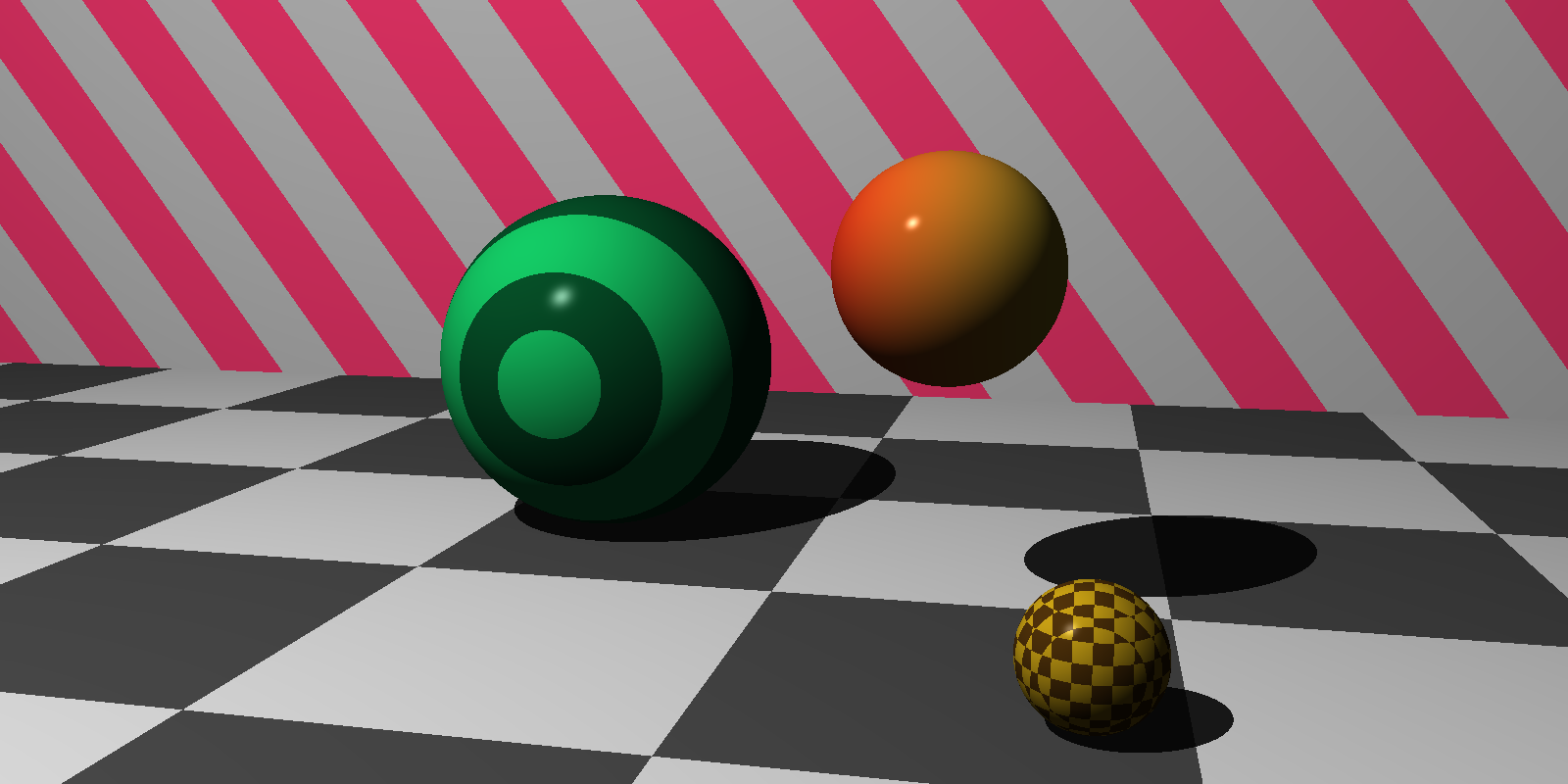
Checking it independently
The from-scratch tracer learned the four patterns (undoing the shape's
and then the pattern's transformation in plain doubles) and a patterns scene.
Every pixel of the 400×200 image (80 000), with shadows:
> powershell.exe -NoProfile -File tools/verify_scene.ps1 out/ch10_patterns.png -Scene patterns -Shadows -Stride 1
decoded by .NET: 400x200; pixels covered by an object: 80000; pixels differing from the independent tracer by more than 1 level: 0 (max difference 0); stride 1 in each direction, 80000 pixels checked
The book's remark about the checkered sphere
Applied to a sphere, the 3D checker pattern carves the sphere out of a block of alternating cubes rather than painting a grid on its surface; the small-checker sphere on the left shows it. Wrapping a 2D texture onto the surface needs UV mapping, which the book leaves out and this project does too.UV mapping maps 2D textures to 3D surfaces
Cost
About 1.9 ms per pixel for the patterned scene with shadows (38 s at 200×100,
measured alone). Each lit point costs
two more mat_tuple calls for the pattern lookup (object space, then pattern
space).
How it is checked
> v2_interp.exe tests/run.patlang --node surfaces/patterns --depth 2
[ ok ] Patterns
[ ok ]   Stripes change colour at every whole x, and nowhere else
[ ok ]   A gradient blends across each unit of x and starts again
[ ok ]   Rings change colour with the distance from the y axis
[ ok ]   Checkers flip colour across every whole x, y and z
[ ok ]   A pattern is read in its own space: the object's transform, then the pattern's
[ ok ]   A patterned material is lit with the pattern's colour at the point
[ ok ]   A pattern keeps its colours and transform; a material's colour and ambient can be set
[ ok ]   Further checks, independent of the code they check
[ ok ]     Pattern_at_shape = plain-arithmetic oracle, 4 patterns x 120 points
[ ok ]     A ring is unchanged by a rotor rotating the point about the y axis
[ ok ]     A ray onto the red stripe returns red (ambient 1)
checks: 10 passed, 0 failed, 0 blocked, 0 skipped, 0 not run
ALL PASSED