Last updated: 2026-11-26
1. The film: a rabbit in a meadow
For new readers
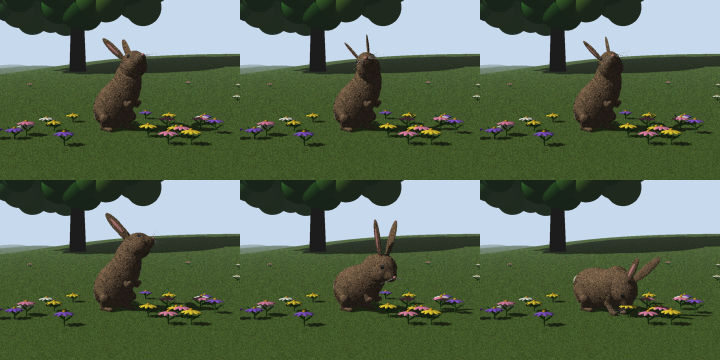
This is the goal of the whole project: five seconds of film, a hundred and fifty frames at thirty a second, of a rabbit in a meadow sitting up, looking to its left and its right, dropping down to nibble a flower and sitting up again, so that the last frame runs on into the first and the film can loop.
A frame is one picture, and everything a picture needs is the subject of the pages after this one: the camera and the world it looks at, light and shadow, glass and air, and the threads and graphics card that make a hundred and fifty pictures practical. The things in the picture are opened in part III: the scene language that describes them, the meadow, and the rabbit with its skeleton and fur. This page takes all of those as given and adds only what a film needs on top of single pictures: a timeline of movement, and a way of rendering only the part of each frame that can have changed, checked to give the very bytes that rendering the whole frame gives.
The movement
The rabbit is posed by the places of its feet and by a few angles. For an animation nine numbers are enough: the pitch of its body about the haunch
(sitting up is 35 degrees, and 0 is the body level, down on its front paws), the turn and nod of its head about the neck, and the places of its two front paws in the frame of its body. They are given
for each moment by keys, a list of [time, value] pairs, and between one key and the next the value eases in and out along half a cosine, so that nothing starts or stops with a jerk.
The time of a loop runs from 0 to 1, and the last key repeats the first, so the loop closes.
# The five seconds of the rabbit's movement, as the numbers that scenes/parts/rigged.scene's rabbit_anim takes, for each frame of a loop that starts
# and ends with the rabbit sitting up, looking ahead.
#   t = 0       sitting up, paws against its belly
#   0.10-0.50   looks to its left, then to its right, then ahead
#   0.45-0.60   drops down onto its front paws, its nose to the flower
#   0.62-0.78   nibbles (three nods)
#   0.80-1.00   rises, and sits up again
# Every movement eases in and out (a half cosine between one key and the next), so that nothing starts or stops with a jerk.

# the value at time t (0 to 1) of keys [[t0, v0], [t1, v1], ...], easing between one key and the next
make a function called tl_keys takes keys, t returns v
  let n = keys.length
  if t <= keys[0][0] then
    return keys[0][1]
  end
  let k = 0
  while k < n - 1 do
    if t <= keys[k + 1][0] then
      let u = (t - keys[k][0]) / (keys[k + 1][0] - keys[k][0])
      let e = (1 - cos(4 * atan(1) * u)) / 2
      return keys[k][1] + (keys[k + 1][1] - keys[k][1]) * e
    end
    let k = k + 1
  end
  return keys[n - 1][1]
end

# a point given in the room's frame (before the rabbit is scaled and turned), in the body's own frame when the body is turned up by `pitch` degrees about the haunch
make a function called tl_body_frame takes p, pitch returns q
  let a = pitch * 4 * atan(1) / 180
  let rx = p[0] + 0.45
  let ry = p[1] - 0.62
  return [0 - 0.45 + rx * cos(a) + ry * sin(a), 0.62 - rx * sin(a) + ry * cos(a), p[2]]
end

# [pitch, hyaw, hpitch, flx, fly, flz, frx, fry, frz] at frame f of `frames`
make a function called rabbit_pose takes f, frames returns pose
  let t = f / frames
  let pi = 4 * atan(1)
  let pitch = tl_keys([[0, 35], [0.45, 35], [0.60, 0], [0.80, 0], [0.97, 35], [1, 35]], t)
  let hyaw = tl_keys([[0, 0], [0.10, 0], [0.20, 38], [0.27, 38], [0.37, 0 - 38], [0.42, 0 - 38], [0.50, 0], [1, 0]], t)
  let hpitch = tl_keys([[0, 0], [0.45, 0], [0.60, 0 - 62], [0.80, 0 - 62], [0.92, 0], [1, 0]], t)
  if t >= 0.62 and t <= 0.78 then
    let hpitch = hpitch + 7 * sin(2 * pi * 3 * (t - 0.62) / 0.16)
  end
  let g = tl_keys([[0, 0], [0.52, 0], [0.60, 1], [0.80, 1], [0.88, 0], [1, 0]], t)
  # the paws: against the belly (in the body's frame) at g = 0, flat on the ground ahead of the chest (in the room's frame) at g = 1
  let gl = tl_body_frame([0.99, 0.06, 0.17], pitch)
  let gr = tl_body_frame([0.99, 0.06, 0 - 0.17], pitch)
  let fl = [0.66 + g * (gl[0] - 0.66), 0.16 + g * (gl[1] - 0.16), 0.16 + g * (gl[2] - 0.16)]
  let fr = [0.66 + g * (gr[0] - 0.66), 0.16 + g * (gr[1] - 0.16), 0 - 0.16 + g * (gr[2] + 0.16)]
  return [pitch, hyaw, hpitch, fl[0], fl[1], fl[2], fr[0], fr[1], fr[2]]
end
scenes/parts/rigged.scene has a definition rabbit_anim that takes those nine numbers (after the seed of its fur) and builds the rabbit in that pose; the legs are still solved from the
feet, as in Animals: a bird, a rabbit and a fox, so that a haunch that tips forward takes the knees with it and the feet stay where they are on the ground.
# the rabbit for an animation: sitting up and moving. The body is turned by `pitch` about the middle of the haunch and the head by `hyaw` (to the side) and
# `hpitch` (nodding, negative is nose down) about the neck, which is a separate surface that overlaps the body's. The hind feet stay on the ground in the room's frame;
# the front paws are put at (flx, fly, flz) and (frx, fry, frz) in the body's own frame, wherever the caller wants them (against the belly, or on the ground).
define rabbit_anim(seed, pitch, hyaw, hpitch, flx, fly, flz, frx, fry, frz)
  ik hl hip (-0.45 + 0.05 * cosd(pitch)) (0.62 + 0.05 * sind(pitch)) 0.4 foot 0.12 0.06 0.4 bones 0.45 0.42 0.45 toe 1 0 0 pole 1 0.1 0.3
  ik hr hip (-0.45 + 0.05 * cosd(pitch)) (0.62 + 0.05 * sind(pitch)) (-0.4) foot 0.12 0.06 (-0.4) bones 0.45 0.42 0.45 toe 1 0 0 pole 1 0.1 (-0.3)
  ik fl hip 0.8 0.58 0.17 foot flx fly flz bones 0.33 0.33 0.14 toe 1 0 0 pole (-1) 0.3 0
  ik fr hip 0.8 0.58 (-0.17) foot frx fry frz bones 0.33 0.33 0.14 toe 1 0 0 pole (-1) 0.3 0
The scene of the animation is the meadow of the earlier picture, at 240 x 180, with the flower the rabbit nibbles added in front of it, and without the rabbit:
# The meadow without the rabbit, for the animation (examples/rabbit_animation.patlang): the camera and the light of scenes/rabbit_meadow.scene at the size of the
# animation, no antialiasing, and the flower that the rabbit nibbles. The rabbit of each frame is added to this world.
param w = 240
param h = 180
size w h
param ty = 0.36
camera from 1.5 0.55 -2.9 to 0 ty 0 fov 36
light point at -60 90 -70
antialias adaptive 1 0.15

fog density 0.006 color 0.78 0.85 0.93

include "parts/meadow.scene"

# the flower under the rabbit's nose when it has dropped down to nibble: 0.35 along and 0.185 across from where it sits
use on_ground_flower(0.35, (-0.185), 0.25, 9, 2)
Six frames of the loop (0, 30, 45, 60, 80 and 100 of 150): sitting, looking to the left, dropping down, nibbling, and on the way back up. The whole film is img/rabbit_animation.gif (and img/rabbit_animation.mp4).
What changes
Only the rabbit moves. The sky, the hills, the oak and the flowers are the same in all hundred and fifty frames, and so is every pixel that neither the rabbit nor its shadow touches. So a frame can be made as
- the plate, the picture of the meadow with no rabbit in it, rendered once; and
- a window, the rectangle of the frame that holds the rabbit and its shadow, rendered for the frame and laid over the plate.
The window is found without rendering anything. The shapes that bound the parts of the rabbit (the ears, the skull, the paws, the haunch, the tail) are given as points in the rabbit's own frame, and each point is sent through the same turns that move the part (the head about the neck, the body about the haunch, then the scale and the turn about the vertical that the scene gives the whole animal), through the camera, and down its shadow ray to the ground. The window is the smallest rectangle of pixels that holds all of those, with a margin.the bounding box is called a dirty rectangle
# the points that bound the parts of the rabbit in the room's frame (before it is scaled and turned)
make a function called rb_points takes pose returns pts
  let pitch = pose[0]
  let hyaw = pose[1]
  let hpitch = pose[2]
  let out = []
  # the head: ear tips, skull, nose, chin, cheeks, eyes, the tips of the whiskers
  let head = [[1.0, 1.95, 0.25], [1.0, 1.95, 0 - 0.25], [1.25, 1.9, 0.2], [1.25, 1.9, 0 - 0.2], [1.2, 1.46, 0], [0.78, 1.1, 0], [1.76, 1.03, 0], [1.5, 0.78, 0], [1.25, 0.95, 0.36], [1.25, 0.95, 0 - 0.36], [1.4, 1.2, 0.3], [1.4, 1.2, 0 - 0.3], [2.1, 0.9, 0.62], [2.1, 0.9, 0 - 0.62], [1.8, 0.82, 0.62], [1.8, 0.82, 0 - 0.62]]
  let i = 0
  while i < head.length do
    let out = list_push(out, rb_body(rb_head(head[i], hyaw, hpitch), pitch))
    let i = i + 1
  end
  # the body: haunch, chest, neck, tail, and the front legs' paws and elbows
  let body = [[0 - 1.08, 0.62, 0], [0 - 0.45, 0.02, 0], [0 - 0.45, 1.22, 0], [0 - 0.45, 0.62, 0.52], [0 - 0.45, 0.62, 0 - 0.52], [0.17, 0.62, 0], [1.03, 0.7, 0], [0.3, 0.17, 0], [0.3, 1.23, 0], [0.3, 0.7, 0.44], [0.3, 0.7, 0 - 0.44], [0.9, 1.0, 0.32], [0.9, 1.0, 0 - 0.32], [0 - 1.36, 0.8, 0], [0 - 1.12, 0.78, 0.24], [0 - 1.12, 0.78, 0 - 0.24], [0.5, 0.2, 0.3], [0.5, 0.2, 0 - 0.3]]
  let i = 0
  while i < body.length do
    let out = list_push(out, rb_body(body[i], pitch))
    let i = i + 1
  end
  let paws = [[pose[3] + 0.16, pose[4] - 0.08, pose[5] + 0.08], [pose[3] + 0.16, pose[4] - 0.08, pose[5] - 0.08], [pose[6] + 0.16, pose[7] - 0.08, pose[8] + 0.08], [pose[6] + 0.16, pose[7] - 0.08, pose[8] - 0.08], [pose[3] - 0.3, pose[4] + 0.2, pose[5]], [pose[6] - 0.3, pose[7] + 0.2, pose[8]]]
  let i = 0
  while i < paws.length do
    let out = list_push(out, rb_body(paws[i], pitch))
    let i = i + 1
  end
  # the hind legs, in the room's frame: feet flat on the ground, knees forward
  let hind = [[0.2, 0.0, 0.46], [0.2, 0.0, 0 - 0.46], [0.2, 0.0, 0.34], [0.2, 0.0, 0 - 0.34], [0 - 0.4, 0.0, 0.46], [0 - 0.4, 0.0, 0 - 0.46], [0.15, 0.62, 0.5], [0.15, 0.62, 0 - 0.5]]
  let i = 0
  while i < hind.length do
    let out = list_push(out, hind[i])
    let i = i + 1
  end
  return out
end

make a function called rabbit_window takes c, pose, light, scale, yaw, margin returns win
  let pts = rb_points(pose)
  let lx = [get_x(light), get_y(light), get_z(light)]
  let x0 = c[0]
  let y0 = c[1]
  let x1 = 0
  let y1 = 0
  let i = 0
  while i < pts.length do
    let w = rb_world(pts[i], scale, yaw)
    let sh = rb_shadow(w, lx)
    let both = [w, sh]
    let j = 0
    while j < 2 do
      let px = camera_project(c, point(both[j][0], both[j][1], both[j][2]))
      if px[0] - margin < x0 then
        let x0 = px[0] - margin
      end
      if px[1] - margin < y0 then
        let y0 = px[1] - margin
      end
      if px[0] + margin > x1 then
        let x1 = px[0] + margin
      end
      if px[1] + margin > y1 then
        let y1 = px[1] + margin
      end
      let j = j + 1
    end
    let i = i + 1
  end
  # pixel numbers: ints
  return [num_max(0, to_int(floor(x0))), num_max(0, to_int(floor(y0))), num_min(c[0], to_int(floor(x1)) + 1), num_min(c[1], to_int(floor(y1)) + 1)]
end
Inside the window, a pixel is worked out in full only if it might differ from the plate. render_changed_window takes the rabbit by itself and asks, for each pixel, whether the rabbit is on the pixel's ray, or between the point where that ray meets the plate and the light. A pixel for which neither is true has the plate's colour, exactly,
and the rest are rendered. That test needs the rabbit not to reflect or refract (it does neither), and it spares the ground's function surface, the expensive part of a pixel in this meadow, for the pixels around the animal.
Checking it
The oracles are the whole pictures that the windows stand for. The film's branch of the test tree (film/frames, shown at the end of this page) checks that a window of a picture has exactly the bytes those pixels have in the whole picture (with and without antialiasing, at the edge of the picture and in the middle), that the plate
with the window of a frame laid over it is the whole frame, byte for byte, for a ball that moves and casts a shadow, and that the timeline is periodic, smooth and keeps every angle inside what a rabbit can do.
For a frame of the real animation, tools/verify_animation_frame.patlang renders the whole frame (the meadow with that frame's rabbit in it) and the composite (the plate with the changed window laid over it), at a small size, and compares the bytes:
> v2_interp.exe tools/verify_animation_frame.patlang --frame 105 --w 80 --h 60 --margin 3
frame 105: window 27 25 to 74 51 of 80 x 60
bytes of the composite that differ from the whole frame: 0 of 14400 (outside the window, bytes of the whole frame that differ from the plate: 0)
What it costs
On the interpreter the cost of a frame is nearly all in the window: the pixels around the rabbit are the ones that meet its fur (thousands of thin cones), the ground's function surface, and a shadow ray each. A frame took about 1800 seconds of one core, so a hundred and fifty frames on twelve cores was an estimate of five and a half hours. The run was stopped after thirty frames, and the rest was made on the graphics card, where each frame takes about four seconds and has the antialiasing of the large picture as well.
examples/rabbit_animation.patlang is the driver: it renders the plate once (and keeps it, so that a stopped run does not render it again), works out where the plate's rays meet its world, and hands the frames to threads, one frame to a thread, with the progress of One model, many threads, and the graphics card answering how far they have got.
A frame whose picture is already in the directory is not rendered again, so a run that is stopped goes on where it left off.
# what a thread does: its frames, one after another (item ["work", [id, frames, shared, progress record]])
make a function called anim_task takes item returns r
  if item[0] == "serve" then
    return rp_serve(item[1])
  end
  if item[0] == "points" then
    let slice = item[1]
    return plate_points(slice[0], slice[1], slice[2], slice[3])
  end
  let id = item[1][0]
  let mine = item[1][1]
  let sh = item[1][2]
  let progress = item[1][3]
  let pics = picture_cache()
  let k = 0
  while k < mine.length do
    do_frame(mine[k], sh, pics)
    let k = k + 1
    rp_note(progress, id, k)
  end
  rp_finish(progress, id)
  return mine.length
end
What went wrong on the way
Three things in the driver are worth the telling, because each cost a run:
- A function that does not exist in a thread kills the thread without a word.
maxis a function of the main program, not of a worker; the workers havenum_maxandnum_min. The first run lost all its workers to that. - The interpreter has a memory safety cap (8192 MB by default). Eighteen threads each holding a copy of the rabbit's scene went past it, the run aborted, and the log had nothing to say for a while.
PATLANG_MAX_MEM_MBraises the cap, and twelve threads fitted. bandis a reserved word of the language, and a variable called that is a syntax error somewhere else entirely; the slices of rows areslice.
How it is checked
The film's own checks are about frames: windows, plates and the timeline. The node also needs the whole picture branch and the whole scene branch, so it passes only when everything the film is made from passes too.
> v2_interp.exe tests/run.patlang --node film --depth 3
[ ok ] The film: a rabbit in a meadow
[ ok ]   Frames of the film
[ ok ]     A window of a picture
[ ok ]       A window has the bytes of its pixels in the whole picture: 5 windows (the whole picture, ...
[ ok ]     The plate and the frame
[ ok ]       A plate (the scene without the moving ball) and a frame (with it): the frame is the plate with the window laid over it that holds what changed
[ ok ]     The timeline
[ ok ]       The loop closes: the pose after the last frame is the first (worst difference
checks: 3 passed, 0 failed, 0 blocked, 0 skipped, 0 not run
ALL PASSED
Graduate Attributes
Modelled on this page
- Subject Specialist: Technical definitions of animation keys, easing functions and rendering windows are applied to solve the specific problem of generating a looping film.
- Digitally Fluent: Execution strategies are chosen based on computational cost, shifting from single-core interpretation to multi-threaded graphics card rendering.
- Critical Thinker: Automated tests verify that composite frames match whole frames byte for byte and that motion remains smooth and periodic.
University of Reading Graduate Attributes framework.